Showing posts with label laravel tutorial. Show all posts

Wednesday, 8 July 2026

Build a School Management System in Laravel 13 | Filament + Tailwind CSS + Source Code


Introduction


Building a real-world web application from scratch is one of the fastest ways to level up as a Laravel developer. And nothing tests your skills across the full stack quite like a School Management System — a project that touches authentication, role-based access control, relational databases, PDF generation, file uploads, dashboards, and complex business logic all at once.

In this tutorial series, we build a complete School Management System (SMS) using Laravel 13, Filament 3, and Tailwind CSS — a modern, professional-grade tech stack used by thousands of production applications worldwide. Whether you are a student working on a college project, a freelancer building a portfolio, or a Laravel developer looking to master Filament, this project delivers everything you need.

The full source code is available — check the YouTube video description for the download link, and follow along with the video tutorial for a step-by-step walkthrough of every module.


What Is a School Management System?


A School Management System (SMS) — also called School ERP Software — is a web-based platform that digitises every administrative and academic operation of a school. From student admissions and attendance tracking to fee collection, examination results, timetable scheduling, library management, and payroll, a modern School ERP replaces paper registers and disconnected spreadsheets with a single, unified system.

This project covers a single-school deployment — the most common requirement for freelance projects and college submissions — but the architecture is clean enough to scale to multi-branch or SaaS use cases with minimal refactoring.

Build a School Management System in Laravel 13 | Filament + Tailwind CSS + Source Code

Who Is This Project For?


Audience How It Helps
Laravel beginners Real-world project covering CRUD, relationships, auth, and policies
Filament learners Complete Filament 3 resource, widget, and custom page examples
College students Full-featured PHP project for final year submission
Freelancers Ready-to-customise School ERP for client delivery
Portfolio builders Impressive, production-quality project to showcase
School administrators Deployable system for actual school operations

Project Overview


This Laravel School Management System is a multi-role, multi-module web application that manages the complete lifecycle of a school — from the moment a parent submits an enquiry to the day a student graduates.

The system is designed around the concept of Academic Year Scoping: every piece of transactional data (enrolments, attendance, marks, fees, timetables) is tied to an academic year. This makes historical reporting clean, year-end transitions smooth, and data integrity rock-solid.


Key highlights of this Laravel project:

  • 22+ fully functional modules covering every department of a school
  • 8 user roles with granular, permission-based access control
  • Filament 3 admin panel with a beautiful, responsive UI out of the box
  • Mobile-first design using Tailwind CSS — works perfectly on phones and tablets
  • PDF generation for report cards, fee receipts, certificates, and more
  • Excel import/export for bulk data operations
  • Role-based analytics dashboards — every role sees data relevant to their work
  • SMS and email notification hooks for absences, fee dues, and exam results
  • Full source code available — link in the YouTube video description

Modules Included in the System


1. Academic Year Management


The backbone of the entire system. Administrators create and manage academic years, define terms and semesters, and control year transitions. Only one year can be active at a time. Locking a past year makes it permanently read-only, protecting historical data from accidental edits.

Key features:

  • Create, edit, and delete academic years
  • Define terms (e.g., Term 1, Term 2, Term 3) per year
  • Activate a new year with a single click
  • Lock completed years to prevent data tampering
  • View a banner on every screen showing the current active year

2. Dashboard (Role-Specific Analytics)


Every user role gets a personalised dashboard packed with real-time KPI cards, charts, and alerts. No two roles see the same screen — the dashboard adapts to show exactly what each user needs.

  • Super Admin: Total students, staff, today's fee collection, pending admissions, monthly trends
  • Principal: Academic performance, class-wise attendance, discipline alerts
  • Teacher: Today's timetable, attendance status, pending homework, low-attendance students
  • Accountant: Collection vs target charts, dues aging, payment mode breakdown
  • Student: Attendance %, upcoming exams, fee dues, subject radar chart
  • Parent: Child's performance, fee timeline, absence alerts
  • Librarian: Books issued/returned today, overdue count, top borrowed books
  • Receptionist: Admission funnel, new enquiries, follow-up reminders

Charts are powered by ApexCharts via Filament's widget system. All KPI widgets are cached and update in real time for critical roles like Accountant.

3. Student Management


A permanent student profile system that stores identity data independently of academic year data.

  • Permanent profile: Name, date of birth, gender, blood group, religion, address, photo
  • Guardian management: Multiple guardians per student with relationship, phone, email, occupation
  • Document vault: Upload and categorise birth certificates, transfer certificates, medical documents
  • Student ID card: PDF generation with photo, class, section, and barcode
  • Search and filter: By class, section, status, admission year

4. Admissions Management


A three-stage admission pipeline that tracks every prospect from first contact to enrolled student.

Stage 1 — Enquiry: Parent name, phone, child name, date of birth, class applying for, source (walk-in, website, referral, phone, social media)

Stage 2 — Application: Full student details, document uploads, application review

Stage 3 — Enrolment: Admission number assigned, fee structure presented, first payment collected, student user account created

Status tracking: Enquiry → Application Received → Under Review → Approved → Enrolled → Rejected

5. Student Promotion & Transfer Engine


One of the most complex modules in any School ERP — handled elegantly with a multi-step Promotion Wizard.

Promotion Wizard steps:

  1. Select source year and target year
  2. Run automatic eligibility check per student (attendance %, failed subjects, fee dues)
  3. Review eligibility table — override individual students with a reason
  4. Confirmation screen with promoted/detained/TC/left counts
  5. Execute bulk promotion in a single DB transaction

Lateral Transfer: Mid-year class/section changes are fully supported. The old enrolment is end-dated and a new one created from the transfer date.

6. Attendance Management


Daily and period-wise attendance for every class.

  • Daily attendance: Class teacher marks Present / Absent / Late / On Leave per student
  • Period-wise attendance: Subject teachers mark attendance per period
  • Leave applications: Students/parents apply → class teacher approves
  • Holiday master: Define school holidays — excluded from attendance denominator automatically
  • Low attendance alerts: Students below threshold flagged on teacher and principal dashboards
  • SMS trigger: Queued job sends an SMS to the parent when a student is marked absent
  • Monthly report: Download class attendance report as PDF or Excel

7. Timetable Management


A visual timetable builder with automatic conflict detection.

  • Period master: Define period slots school-wide
  • Timetable builder: Assign subject + teacher to each period per day per class-section
  • Conflict detection: Prevents double-booking a teacher for two classes at the same time
  • Class view: Day-vs-period grid for any class
  • Teacher view: A teacher's complete weekly schedule across all their classes
  • Student view: Read-only timetable in the student portal

8. Fee Management


A complete billing and collection system for school fees.

  • Fee heads: Permanent categories (Tuition, Lab, Transport, Activity, Hostel)
  • Fee structures: Amounts per class per academic year
  • Bulk invoice generation: Generate all invoices for a class in one click
  • Concessions/Scholarships: Fixed or percentage discount per student per fee head
  • Payments: Record cash, UPI, cheque, online — partial payments supported
  • Late fine: Auto-calculated based on configurable grace days and fine-per-day rate
  • Fee receipt PDF: Professional receipt with school logo, student name, payment details
  • Defaulters report: Exportable list of overdue invoices with parent contact details
  • Dues aging: Categorised into 0–30, 31–60, and 60+ days overdue

9. Examinations & Grades


From scheduling exams to publishing report cards.

  • Exam types: Unit Test 1, Mid-term, Final — defined per academic year
  • Exam schedules: Date, subject, class, max marks, pass marks per exam
  • Mark entry: Spreadsheet-style grid — teachers enter marks per student in one screen
  • Bulk import: Upload marks via Excel template
  • Auto grading: Grades calculated automatically from configurable grade scales
  • Rank calculation: Student rank within class computed per exam
  • Co-scholastic grades: Sports, arts, behaviour — graded by letter, not marks
  • Report card PDF: Professional A4 report card with marks table, grades, rank, and attendance %
  • Publish action: Locks marks and sends notifications to students and parents

10. Student History Ledger


A consolidated, read-only view of a student's complete academic journey across all years.

  • Year-by-year card: class, section, attendance %, overall marks %, promotion outcome
  • Expandable year cards showing exam results and fee summary
  • Performance vs last year comparison chart
  • Available to Super Admin, Principal, and the student themselves

11. Communication & Notices


School-wide and targeted communication tools.

  • Notices: Post announcements targeted to all, a specific role group, a class, or a section
  • Priority levels: Normal or Urgent
  • SMS integration: Send bulk SMS to parents via MSG91 or Twilio
  • Email notifications: Laravel Mail for fee reminders, result publications, event notices
  • In-app notifications: Filament notification system for real-time alerts

12. Homework & Assignments


  • Teachers create homework per class-section-subject with due dates and file attachments
  • System auto-creates pending submission rows for every enrolled student
  • Students submit via the student portal (text + file upload)
  • Teachers grade submissions in a spreadsheet-style grid
  • Submission status: Pending / Submitted / Graded

13. Certificates & Documents


  • Bonafide Certificate: Confirms student is enrolled at the school
  • Transfer Certificate (TC): Issued when a student leaves
  • Conduct Certificate: Character reference for a student
  • Issuance log with date, issued by, and purpose

14. HR & Staff Management


  • Staff permanent profiles: designation, department, joining date, qualifications
  • Leave types and leave balance management
  • Leave application and approval workflow
  • Experience letter generation

15. Payroll & Expenses


  • Salary structures with allowances and deductions
  • Monthly salary disbursements with slip generation
  • Expense heads and voucher recording
  • Salary register Excel export

16. Library Management


  • Book catalogue: Categories, books, multiple copies per book, shelf location
  • Memberships: Year-scoped membership for students and staff
  • Issue & Return: Lock-safe issue preventing over-issue
  • Reservations: Reserve a book when all copies are on loan
  • Fines: Per-day fine calculated on return
  • Reports: Overdue list, inventory, popular books, fine collection

17. Transport Management


  • Route master with start/end points and stops
  • Vehicle master (number, capacity, driver)
  • Student transport allocations per year
  • Route-wise student list for drivers

18. Hostel Management


  • Block and room master (room number, type, capacity)
  • Student hostel allocations per year
  • Room occupancy tracking

19. Health & Medical


  • Permanent student health record: allergies, medical conditions, blood group
  • Sick visit log: date, symptoms, diagnosis, treatment, follow-up
  • Vaccination records with due-date reminders

20. Discipline & Awards


  • Incident types with configurable point deductions
  • Discipline incident logging with action taken and approval workflow
  • Award types with point additions
  • Student conduct score calculated automatically
  • Co-curricular activity tracking (sports, arts, clubs)

21. Events, Gallery & Calendar


  • School event creation with organiser, dates, description, publish control
  • Photo gallery per event (multi-photo upload)
  • Visual calendar view showing events and holidays
  • Student portal events page

22. Reports & Analytics


  • Financial Report: Date-range fee collection with Excel + PDF export
  • Academic Report: Class-wise result analysis, subject performance
  • Attendance Report: Monthly class attendance, low-attendance student list
  • Library Report: Overdue books, inventory, popular books
  • Admissions Report: Enquiry register, conversion funnel, seat availability

System Users and Role-Based Access


This School Management System implements 8 user roles using Spatie Laravel Permission — the most popular role and permission package in the Laravel ecosystem.

Super Admin


The highest privilege level. Super Admin bypasses all permission checks — no individual permission assignments needed.

  • Full access to every module without restriction
  • Academic year management: create, activate, lock years
  • User and role management: create staff accounts, assign roles
  • Run the Student Promotion Engine at year end
  • View all analytics and generate all reports

Principal


School-level oversight with read-heavy, approval-heavy access.

  • Approve discipline incidents and staff leave applications
  • Publish exam results
  • View all class and subject performance reports
  • Post school-wide notices
  • Generate academic report cards

Teacher


Scoped strictly to their own assigned classes and subjects.

  • Mark daily attendance for their class
  • Enter marks for their assigned subjects
  • Create and grade homework assignments
  • Log discipline incidents for their students
  • View their own class performance analytics
  • Cannot view other classes' data — hard-scoped in the backend

Student


Read-only access to their own academic data via a dedicated student portal (/student).

  • View and download report cards (PDF)
  • Download fee receipts (PDF)
  • Submit homework assignments (file + text)
  • Apply for leave
  • Request attendance or bonafide certificate

Parent


Mirror of the Student role — same data, parent's perspective. Supports multiple children via a child-selector tab.

  • Switch between multiple children instantly
  • View child's attendance, marks, fee status
  • Receive SMS/email alerts for absences, fee dues, exam results

Accountant


Full access to financial modules only.

  • Generate bulk fee invoices for a class
  • Record fee payments and issue receipts
  • Grant concessions/scholarships
  • Process monthly payroll
  • Generate day book, defaulters list, collection reports
  • Export all financial data to Excel or PDF

Librarian


Scoped entirely to the library module.

  • Issue and return books
  • Manage book catalogue and copy inventory
  • Create and renew library memberships
  • Collect and record fines
  • Generate overdue and inventory reports

Receptionist


Front desk operations — admissions and communication.

  • Log new admission enquiries
  • Move applications through the pipeline stages
  • Issue bonafide, TC, and conduct certificates
  • Post school notices
  • View seat availability per class

Technology Stack


Laravel 13


Laravel is the most popular PHP framework in the world. This project uses Laravel's full feature set: Eloquent ORM, Queue system, Mail, Storage, Policies, Observers, Scopes, Service classes, and Form Requests.

Filament 3


Filament is a rapid application development framework built on top of Laravel and Livewire. It generates a complete, beautiful admin panel with minimal boilerplate. This project uses Filament for all admin panel CRUD resources, custom pages, dashboard widgets, actions, and a separate student portal panel.

Tailwind CSS


Tailwind CSS is a utility-first CSS framework that ships with Filament out of the box. Every UI component is styled with Tailwind utility classes following a consistent design language.

PHP 8.4


This project uses PHP 8.1+ backed enums for all status fields, making status values type-safe and self-documenting.

MySQL 8.4


All data is stored in MySQL 8.4 with proper indexing for analytics queries and a strict academic year scoping pattern.

Key Packages


Package Purpose
spatie/laravel-permission Roles and permission management
barryvdh/laravel-dompdf PDF generation (report cards, receipts, certificates)
maatwebsite/laravel-excel Excel import/export (marks, fee defaulters, reports)
intervention/image Photo resizing and processing

Why Use This Project?


For Laravel Beginners


This project teaches you how Laravel applications are structured in the real world — not a simple todo app, but a full production system with services, observers, policies, jobs, notifications, and custom Filament pages. Every major Laravel concept appears in context.

For Filament Learners


There is no better way to learn Filament 3 than to see it applied across 22 modules. This project covers every major Filament primitive: Resources, RelationManagers, Custom Pages, Actions, Widgets, Notifications, and Panel Providers.

For College Students


A School Management System hits every checkbox on a final-year project rubric: authentication, RBAC, CRUD operations, reporting, file handling, PDF generation, and a polished UI. This project is ready to present.

For Freelancers


Need to deliver a School ERP to a client? This codebase gives you a solid, well-architected foundation. Customise the modules, add the school's branding, and deploy.

For Portfolio Builders


A School Management System demonstrates breadth: database design, backend logic, frontend UI, PDF generation, Excel integration, role-based access, analytics — all in one project.

For Understanding School ERP Systems


If you want to understand how enterprise resource planning systems work in the education sector, this project is a clean, readable, well-documented implementation. The patterns here apply directly to hospital management systems, hotel management systems, and any other multi-role ERP domain.


Source Code Download


The complete source code for this School Management System is available for download. You will find the download link in the description of the YouTube tutorial video.

The source code includes:

  • All migrations, models, and seeders (including demo data with 270 realistic students)
  • All Filament resources, pages, and widgets for every module
  • All service classes and business logic
  • PDF Blade templates for report cards, receipts, and certificates
  • Student portal with mobile-first design
  • .env.example with all required configuration keys

To get the source code:


Sample Login Details


URL Role Email Password
APP_URL/admin Super Admin admin@vadodarasms.edu.in password
APP_URL/admin Principal principal@vadodarasms.edu.in password
APP_URL/admin Accountant accountant@vadodarasms.edu.in password
APP_URL/admin Librarian librarian@vadodarasms.edu.in password
APP_URL/admin Receptionist receptionist@vadodarasms.edu.in password
APP_URL/admin Teacher (any 1–30) teacher.1@vadodarasms.edu.in password
APP_URL/student Student Portal student.1@vadodarasms.edu.in student123
APP_URL/student Parent Portal parent.1@vadodarasms.edu.in parent123

Getting Started — Quick Setup


Once you have downloaded the source code, getting the project running locally takes just a few minutes:

# 1. Install dependencies
  composer install
  npm install

  # 2. Copy environment file and configure your database
  cp .env.example .env
  php artisan key:generate

  # 3. Run migrations and seed demo data
  php artisan migrate
  php artisan db:seed

  # 4. Create storage symlink
  php artisan storage:link

  # 5. Start the development server
  php artisan serve
  

Then open http://localhost:8000/admin and log in with the demo credentials provided in the video.

The demo seeder populates the system with 270 realistic students across Grades 1–8, two academic years of historical data, complete attendance records, exam results, fee transactions, and more — so every dashboard shows live, meaningful data from the moment you log in.


Conclusion


This Laravel 13 School Management System is one of the most complete PHP projects available for learning and real-world deployment. Built on Filament 3, styled with Tailwind CSS, and powered by a carefully designed MySQL database, it covers every aspect of school administration in a single, unified platform.

Whether you are building your first Laravel project, preparing a final-year submission, expanding your freelance portfolio, or evaluating Filament as an admin panel framework — this project delivers.

Here is what to do next:

  1. Watch the YouTube tutorial — a full step-by-step walkthrough of every module
  2. Download the source code — link in the video description
  3. Run the project locally — follow the quick setup above
  4. Explore and customise — modify modules, add features, make it your own
  5. Share this article — help other Laravel developers discover this resource
  6. Leave a comment — ask questions, share what you built, give feedback
  7. Subscribe — more Laravel tutorials, Filament deep-dives, and PHP projects are coming

Thank you for reading. Now go build something great.


Tags: Laravel 13, Filament, Tailwind CSS, School Management System, Laravel Project, Laravel Source Code, Filament Admin Panel, Laravel CRUD, Student Management System, PHP Project, School ERP, Laravel Tutorial, School ERP Software, School Management Software, Laravel Filament Tutorial, PHP School Project
Saturday, 16 July 2022

Build Laravel 9 CRUD Application with MySQL & Bootstrap 5

Build Laravel 9 CRUD Application with MySQL & Bootstrap 5


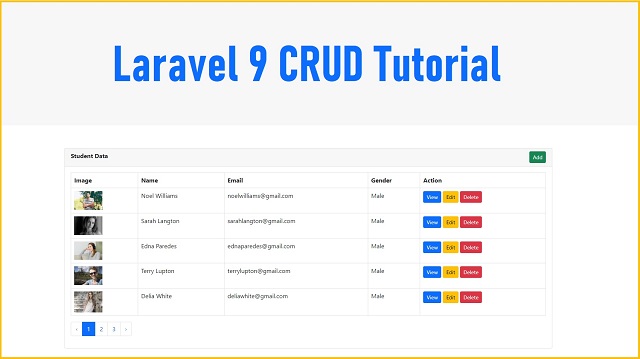
In this tutorial, we are going to show you how to make CRUD Application Laravel 9 framework. We will explained you step by step, how can we perform CRUD Operation in Laravel 9 Framework. So if you beginner in Laravel framework then this tutorial will help you to build CRUD Application in Laravel 9 framework, and you will be able to create Laravel 9 CRUN Application. Here under this tutorial, we will use basic example to show you CRUD Operation in Laravel 9.

Recently Laravel has release Laravel 9 framework and in Laravel 9 framework there is several new features and LTS Support. Laravel 9 also introduced an Anonymous Sub Migration also and it also resolved migration class name Collison. One more things Laravel 9 framework has been use PHP 8 version and it has been support PHP string function, which are very useful for string operations. There are many new query builder function has been introduced under Laravel 9 framework which will more convenient when you have work with database operation. So you are learn Laravel framework first time then this tutorial will help you to create CRUD (Create, Read, Update and Delete) Operation in Laravel 9 framework.

In this tutorial, we will create Student CRUD Application in Laravel 9 framework. Under this CRUD Application we will make Application, in which we can Add new Student Data, with student image upload, edit or change existing student data, with form data validation, show single student data on the web page, delete or remove student data from data and fetch all student data from MySQL database and display on the web page in HTML table format with dynamic pagination link. We will also create table in MySQL database from this Laravel 9 application using Laravel 9 Migration, and after this, we will create Controller, Models and views file for student crud application. Under this Laravel 9 crud application we will use Bootstrap 5 library for design web page. You have to following below steps to create CRUD Application in Laravel 9 framework.


Step 1 - Download & Install 9


In the First Steps of Laravel 9 CRUD Application, we have to download and install fresh Laravel 9 Application in our computer. So for this, you have to goes to command prompt and then after goes into directory where you have run PHP 8 script and then after you have to run following command.


composer create-project --prefer-dist laravel/laravel laravel_9_crud


Once we have run this command then it will create laravel_9_crud directory and under this directory it will download and install Laravel 9 Application.

Step 2 - Make Database Connection


After install Laravel 9 application, first we need to create database connection with MySQL database. So for this we have to open .env file and under this file, we need to add MySQL database configuration like MySQL database name, MySQL database user namd and password details. Once we have define this details, then it will make MySQL database connection in Laravel 9 framework. Below you can find MySQL database configuration details.

.env

DB_CONNECTION=mysql
DB_HOST=127.0.0.1
DB_PORT=3306
DB_DATABASE=testing
DB_USERNAME=root
DB_PASSWORD=


Step 3 - Create MySQL Table using Laravel 9 Migration


Under this step, we have to crate students table under MySQL database from this Laravel 9 Application using Migrations. So first we have to create migration file under Laravel 9 application, so we have to run following command in command prompt.


php artisan make:migration create_students_table --create=students


After run above command then you will find one new file under database/migrations directory. So for we have to open that file and under that file, we have to define following code under that migrations file for create students table in MySQL database.


<?php

use Illuminate\Database\Migrations\Migration;
use Illuminate\Database\Schema\Blueprint;
use Illuminate\Support\Facades\Schema;

return new class extends Migration
{
    /**
     * Run the migrations.
     *
     * @return void
     */
    public function up()
    {
        Schema::create('students', function (Blueprint $table) {
            $table->id();
            $table->string('student_name');
            $table->string('student_email');
            $table->enum('student_gender', ['Male', 'Female']);
            $table->string('student_image');
            $table->timestamps();
        });
    }

    /**
     * Reverse the migrations.
     *
     * @return void
     */
    public function down()
    {
        Schema::dropIfExists('students');
    }
};


After above code in migration file, now for create table in MySQL database from this Laravel 9 application, so for this, we have to run following command in command prompt and it will migrate MySQL table defination to MySQL database and create students table in MySQL database from this Laravel 9 Application.


php artisan migrate


Step 4 - Create CRUD Model and Controller


Under this step, we have to create Controller and Models file for CRUD Operation. So for this, we have goes to command prompt and run following command, which will create new CRUD StudentController and Student Model class file under Laravel 9 framework.


php artisan make:controller StudentController --resource --model=Student


So after run above command it will create Student.php model class file under app/Models directory and we have to open that file and put following code under that file.

app/Models/Student.php

<?php

namespace App\Models;

use Illuminate\Database\Eloquent\Factories\HasFactory;
use Illuminate\Database\Eloquent\Model;

class Student extends Model
{
    use HasFactory;

    protected $fillable = ['student_name', 'student_email', 'student_gender', 'student_image'];
}


And after run above command it will also create CRUD Controller with name StudentController.php file under app/Http/Controllers directory.

So this StudentController.php file has been created with seven method by default which you can seen below.

  1. index() - This is root method of this Controller class.
  2. create() - This is method has been used for load Add student form in the browser.
  3. store() - This method has been used for handle Add student data request.
  4. show() - This method has been used for display single student data on the web page.
  5. edit() - This method has been used for load edit student form in the browser.
  6. update() - This method has been receive student update form data request.
  7. destroy() - This method has been used for delete student data from database.

For create CRUD Application, you have to put folliowing code under StudentController.php file.

app/Http/Controllers/StudentController.php app/Http/Controllers/StudentController.php

<?php

namespace App\Http\Controllers;

use App\Models\Student;
use Illuminate\Http\Request;

class StudentController extends Controller
{
    /**
     * Display a listing of the resource.
     *
     * @return \Illuminate\Http\Response
     */
    public function index()
    {
        $data = Student::latest()->paginate(5);

        return view('index', compact('data'))->with('i', (request()->input('page', 1) - 1) * 5);
    }

    /**
     * Show the form for creating a new resource.
     *
     * @return \Illuminate\Http\Response
     */
    public function create()
    {
        return view('create');
    }

    /**
     * Store a newly created resource in storage.
     *
     * @param  \Illuminate\Http\Request  $request
     * @return \Illuminate\Http\Response
     */
    public function store(Request $request)
    {
        $request->validate([
            'student_name'          =>  'required',
            'student_email'         =>  'required|email|unique:students',
            'student_image'         =>  'required|image|mimes:jpg,png,jpeg,gif,svg|max:2048|dimensions:min_width=100,min_height=100,max_width=1000,max_height=1000'
        ]);

        $file_name = time() . '.' . request()->student_image->getClientOriginalExtension();

        request()->student_image->move(public_path('images'), $file_name);

        $student = new Student;

        $student->student_name = $request->student_name;
        $student->student_email = $request->student_email;
        $student->student_gender = $request->student_gender;
        $student->student_image = $file_name;

        $student->save();

        return redirect()->route('students.index')->with('success', 'Student Added successfully.');
    }

    /**
     * Display the specified resource.
     *
     * @param  \App\Models\Student  $student
     * @return \Illuminate\Http\Response
     */
    public function show(Student $student)
    {
        return view('show', compact('student'));
    }

    /**
     * Show the form for editing the specified resource.
     *
     * @param  \App\Models\Student  $student
     * @return \Illuminate\Http\Response
     */
    public function edit(Student $student)
    {
        return view('edit', compact('student'));
    }

    /**
     * Update the specified resource in storage.
     *
     * @param  \Illuminate\Http\Request  $request
     * @param  \App\Models\Student  $student
     * @return \Illuminate\Http\Response
     */
    public function update(Request $request, Student $student)
    {
        $request->validate([
            'student_name'      =>  'required',
            'student_email'     =>  'required|email',
            'student_image'     =>  'image|mimes:jpg,png,jpeg,gif,svg|max:2048|dimensions:min_width=100,min_height=100,max_width=1000,max_height=1000'
        ]);

        $student_image = $request->hidden_student_image;

        if($request->student_image != '')
        {
            $student_image = time() . '.' . request()->student_image->getClientOriginalExtension();

            request()->student_image->move(public_path('images'), $student_image);
        }

        $student = Student::find($request->hidden_id);

        $student->student_name = $request->student_name;

        $student->student_email = $request->student_email;

        $student->student_gender = $request->student_gender;

        $student->student_image = $student_image;

        $student->save();

        return redirect()->route('students.index')->with('success', 'Student Data has been updated successfully');
    }

    /**
     * Remove the specified resource from storage.
     *
     * @param  \App\Models\Student  $student
     * @return \Illuminate\Http\Response
     */
    public function destroy(Student $student)
    {
        $student->delete();

        return redirect()->route('students.index')->with('success', 'Student Data deleted successfully');
    }
}


Step 5 - Add Service Provider for Bootstrap Pagination


In Laravel 9 framework produce default style pagination link which will not properly display if you have Bootstrap library. So for this, we have to open app/Providers/AppServiceProvider.php and under this file, we have to add Paginator::useBootstrap() code under boot() method for support the bootstrap pagination.

app/Providers/AppServiceProvider.php

<?php

namespace App\Providers;

use Illuminate\Support\ServiceProvider;
use Illuminate\Pagination\Paginator;

class AppServiceProvider extends ServiceProvider
{
    /**
     * Register any application services.
     *
     * @return void
     */
    public function register()
    {
        //
    }

    /**
     * Bootstrap any application services.
     *
     * @return void
     */
    public function boot()
    {
        Paginator::useBootstrap();
    }
}


So after adding this code, you Laravel 9 application will display proper pagination link on the web page.

Step 6 - Create Views Blades File


Under this steps, we have to create blades files for display HTML output in the browser. In the Laravel 9 framework, blades files has been stored under resources/views directory. Under this Laravel 9 CRUD Application, we have to create following views blades files.

  1. master.blade.php - This is master template file.
  2. index.blade.php - This file we will used for display MySQL table data on the web page in HTML table format with pagination link.
  3. create.blade.php - This file has been used for load Create Student form on the web page.
  4. show.blade.php - This file has been used for display single student data on the web page.
  5. edit.blade.php - This file has been used for load student edit form in the browser.

Below you can find source code of all blade file.

resources/views/master.blade.php

<!DOCTYPE html>
<html lang="en">
<head>
    <meta charset="utf-8">
    <meta name="viewport" content="width=device-width, initial-scale=1">
    <title>Laravel 9 CRUD Application</title>
    <link href="https://cdn.jsdelivr.net/npm/bootstrap@5.0.1/dist/css/bootstrap.min.css" rel="stylesheet">
</head>
<body>
    <div class="container mt-5">
        
        <h1 class="text-primary mt-3 mb-4 text-center"><b>Laravel 9 Crud Application</b></h1>
        
        @yield('content')
        
    </div>
    
</body>
</html>


resources/views/index.blade.php

@extends('master')

@section('content')

@if($message = Session::get('success'))

<div class="alert alert-success">
	{{ $message }}
</div>

@endif

<div class="card">
	<div class="card-header">
		<div class="row">
			<div class="col col-md-6"><b>Student Data</b></div>
			<div class="col col-md-6">
				<a href="{{ route('students.create') }}" class="btn btn-success btn-sm float-end">Add</a>
			</div>
		</div>
	</div>
	<div class="card-body">
		<table class="table table-bordered">
			<tr>
				<th>Image</th>
				<th>Name</th>
				<th>Email</th>
				<th>Gender</th>
				<th>Action</th>
			</tr>
			@if(count($data) > 0)

				@foreach($data as $row)

					<tr>
						<td><img src="{{ asset('images/' . $row->student_image) }}" width="75" /></td>
						<td>{{ $row->student_name }}</td>
						<td>{{ $row->student_email }}</td>
						<td>{{ $row->student_gender }}</td>
						<td>
							<form method="post" action="{{ route('students.destroy', $row->id) }}">
								@csrf
								@method('DELETE')
								<a href="{{ route('students.show', $row->id) }}" class="btn btn-primary btn-sm">View</a>
								<a href="{{ route('students.edit', $row->id) }}" class="btn btn-warning btn-sm">Edit</a>
								<input type="submit" class="btn btn-danger btn-sm" value="Delete" />
							</form>
							
						</td>
					</tr>

				@endforeach

			@else
				<tr>
					<td colspan="5" class="text-center">No Data Found</td>
				</tr>
			@endif
		</table>
		{!! $data->links() !!}
	</div>
</div>

@endsection


resources/views/create.blade.php

@extends('master')

@section('content')

@if($errors->any())

<div class="alert alert-danger">
	<ul>
	@foreach($errors->all() as $error)

		<li>{{ $error }}</li>

	@endforeach
	</ul>
</div>

@endif

<div class="card">
	<div class="card-header">Add Student</div>
	<div class="card-body">
		<form method="post" action="{{ route('students.store') }}" enctype="multipart/form-data">
			@csrf
			<div class="row mb-3">
				<label class="col-sm-2 col-label-form">Student Name</label>
				<div class="col-sm-10">
					<input type="text" name="student_name" class="form-control" />
				</div>
			</div>
			<div class="row mb-3">
				<label class="col-sm-2 col-label-form">Student Email</label>
				<div class="col-sm-10">
					<input type="text" name="student_email" class="form-control" />
				</div>
			</div>
			<div class="row mb-4">
				<label class="col-sm-2 col-label-form">Student Gender</label>
				<div class="col-sm-10">
					<select name="student_gender" class="form-control">
						<option value="Male">Male</option>
						<option value="Female">Female</option>
					</select>
				</div>
			</div>
			<div class="row mb-4">
				<label class="col-sm-2 col-label-form">Student Image</label>
				<div class="col-sm-10">
					<input type="file" name="student_image" />
				</div>
			</div>
			<div class="text-center">
				<input type="submit" class="btn btn-primary" value="Add" />
			</div>	
		</form>
	</div>
</div>

@endsection('content')


resources/views/show.blade.php

@extends('master')

@section('content')

<div class="card">
	<div class="card-header">
		<div class="row">
			<div class="col col-md-6"><b>Student Details</b></div>
			<div class="col col-md-6">
				<a href="{{ route('students.index') }}" class="btn btn-primary btn-sm float-end">View All</a>
			</div>
		</div>
	</div>
	<div class="card-body">
		<div class="row mb-3">
			<label class="col-sm-2 col-label-form"><b>Student Name</b></label>
			<div class="col-sm-10">
				{{ $student->student_name }}
			</div>
		</div>
		<div class="row mb-3">
			<label class="col-sm-2 col-label-form"><b>Student Email</b></label>
			<div class="col-sm-10">
				{{ $student->student_email }}
			</div>
		</div>
		<div class="row mb-4">
			<label class="col-sm-2 col-label-form"><b>Student Gender</b></label>
			<div class="col-sm-10">
				{{ $student->student_gender }}
			</div>
		</div>
		<div class="row mb-4">
			<label class="col-sm-2 col-label-form"><b>Student Image</b></label>
			<div class="col-sm-10">
				<img src="{{ asset('images/' .  $student->student_image) }}" width="200" class="img-thumbnail" />
			</div>
		</div>
	</div>
</div>

@endsection('content')


resources/views/edit.blade.php

@extends('master')

@section('content')

<div class="card">
	<div class="card-header">Edit Student</div>
	<div class="card-body">
		<form method="post" action="{{ route('students.update', $student->id) }}" enctype="multipart/form-data">
			@csrf
			@method('PUT')
			<div class="row mb-3">
				<label class="col-sm-2 col-label-form">Student Name</label>
				<div class="col-sm-10">
					<input type="text" name="student_name" class="form-control" value="{{ $student->student_name }}" />
				</div>
			</div>
			<div class="row mb-3">
				<label class="col-sm-2 col-label-form">Student Email</label>
				<div class="col-sm-10">
					<input type="text" name="student_email" class="form-control" value="{{ $student->student_email }}" />
				</div>
			</div>
			<div class="row mb-4">
				<label class="col-sm-2 col-label-form">Student Gender</label>
				<div class="col-sm-10">
					<select name="student_gender" class="form-control">
						<option value="Male">Male</option>
						<option value="Female">Female</option>
					</select>
				</div>
			</div>
			<div class="row mb-4">
				<label class="col-sm-2 col-label-form">Student Image</label>
				<div class="col-sm-10">
					<input type="file" name="student_image" />
					<br />
					<img src="{{ asset('images/' . $student->student_image) }}" width="100" class="img-thumbnail" />
					<input type="hidden" name="hidden_student_image" value="{{ $student->student_image }}" />
				</div>
			</div>
			<div class="text-center">
				<input type="hidden" name="hidden_id" value="{{ $student->id }}" />
				<input type="submit" class="btn btn-primary" value="Edit" />
			</div>	
		</form>
	</div>
</div>
<script>
document.getElementsByName('student_gender')[0].value = "{{ $student->student_gender }}";
</script>

@endsection('content')


Step 7 - Set Resource Route


Under this step, we have to add resource route for student crud application. So for set route, we have to open routes/web.php file and under this file, we have to define resource route for Laravel 9 CRUD Application.

routes/web.php

<?php

use Illuminate\Support\Facades\Route;

use App\Http\Controllers\StudentController;

/*
|--------------------------------------------------------------------------
| Web Routes
|--------------------------------------------------------------------------
|
| Here is where you can register web routes for your application. These
| routes are loaded by the RouteServiceProvider within a group which
| contains the "web" middleware group. Now create something great!
|
*/

Route::get('/', function () {
    return view('welcome');
});


Route::resource('students', StudentController::class);


After adding above code, then it will set route for all method of StudentController.php file.

Step 8 - Run Laravel 9 CRUD Application


When we have follow all above steps, that means our Laravel 9 CRUD Application is ready for check output in the browser. So for check output in the browser, first we need to start Laravel 9 Application server, so for this, we have go to command prompt and run following command.


php artisan serve


So this command will start Laravel server and provide us base url of our Laravel 9 CRUD Application. So we have goes to browser, and type give below URL and view output of Laravel 9 CRUD Application.


http://127.0.0.1:8000/students


So this is complete step by step tutorial on Laravel 9 CRUD Application, so you have follow all above steps then you can able to learn How to perform Insert, Update, Delete and Read MySQL Data Operation in Laravel 9 framework and build CRUD Application Laravel 9 framework with MySQL database and Bootstrap 5 Library.

Laravel 9 CRUD Application Video Tutorial


1 - Load MySQL Data in HTML Table with Pagination Links


2 - Insert or Add Data into MySQL Table


3 - Retrieve MySQL Data & Display on Web page


4 - Update or Edit MySQL Data


5 - Delete or Remove Data From MySQL


Wednesday, 29 April 2020

How to Upload a Laravel App on Shared Hosting Server like GoDaddy


Laravel is a PHP framework that’s an excellent option for website development. The simple syntax is elegant and expressive, which makes the development process more rewarding and creative. For developers of PHP, Laravel development has been hailed as the best for bringing out an element of joy.

The framework definitely is worth learning. Its usage curve continues to go up and there’s a great chance that it would be used more this year than in previous years. There are many reasons for the growth of Laravel development, in particular the security, ease of use, and scalability it brings.

Furthermore, a Laravel app could be deployed on a shared hosting server such as GoDaddy. GoDaddy is a publicly-traded domain registrar and a web hosting company as well. It approximately has more than 18 million customers and over 9,000 staff all over the world, including the UK. It’s renowned for advertising in newspapers and TV.

If you want to upload a Laravel app to GoDaddy, here are some requirements:

     -  GoDaddy shared hosting account
     -  Amazing Laravel project to be deployed
     -  SSH access

THE STEPS


The first thing you have to do is to select a domain name and choose a hosting plan. You could choose the first option.


After making your purchase, you now have access to your Cpanel. The first thing that you should do is to enable SSH. To be able to do that, go to your products and then click Manage on.


You would then be redirected to your Cpanel page. At the bottom right you could enable your SSH.


For you to connect to SSH, you would need these: Host, username, and password. If you’re using Windows, it would be easy to connect with Putty. On Linux, you could utilize your Terminal by typing:


It would then ask for a password, that’s the same with your Cpanel.

Laravel Deployment


Login to your SSH account and Install composer with these 4 commands


In order to verify that the Composer is already installed on your server, you could check the version:


You can now make a fresh Laravel installation with the use of Composer:


If you have developed your app on local already, consider zipping your files and then uploading them to your Cpanel with FTP or the uploader via the file manager. How to do it? Make a new folder in your public_html, then rename it, for instance: blog


You can then upload your zip, then extract all of your files.


You must now move the public folder into public_html


Now, we have to go to our folder public and then edit the index.php


You must edit line 22 and 36 by adding the path name that we already have created, in this case, it’s blogf, on the top of the article I stated: blog. Furthermore, the folder was renamed to blogf since there is a route in a Laravel project that has a similar name, thus you must take this case into account. Now, if you visit your link, you would be facing HTTP Error 403—Forbidden. So, how do you fix this?

Simply make a .htaccess file in the public_html, then pass this:


In the .htaccess, you have to change blog if you are using a different folder name. You can visit your application now. For the database:

     1.  Update the .env file.
     2.  Build a database and a user (Link them).
     3.  Run the PHP artisan migrate, which is working on GoDaddy now.

If you should wish to install node in your server, you can use nvm.

Login to your SSH then type the following command:


The command should be run in order, to be able to use it:


You could then install node after:


Author Bio:


Shira Gray is working as a Business Development Executive at Laravel Development Company – eTatvaSoft. She writes about emerging technologies and you can visit our blog to know more about her writings. Being a tech geek, she keeps a close watch over the industry focusing on the latest technology news and gadgets.


Monday, 24 June 2019

Laravel 5.8 Tutorial - File Upload with Progress Bar using Ajax


If you are looking for Laravel 5.8 web tutorial for learn How to Upload File or Image in Laravel 5.8 with Progress bar for display uploading process, then you have come on right place because you can find complete step by step tutorial for display uploading process in progress bar using Ajax jQuery in Laravel 5.8 framework. Here we have make tutorial on topic like Laravel file upload with Progress bar using Ajax jQuery.

Now in your mind one question is aris why we want to use progress bar while uploading of file. So, the answer is that if you have done file or image uploading in normal way then user can not see uploading process. So it is proper in web development, but if in your application you have to allowed large amount of File or image for uploading then at that time if you have not use progress bar then User of the system did not get idea about image or file has been done uploading or not. So, At that time if you have use progress bar while uploading of file then user can see how many percentage of uploading process of completed and how many percentage is remaining. So, this the main benefits of using progress bar for show uploading process on web page. In this post we will make feature like show progress bar while uploading of file in Laravel 5.8.

Here we have use jQuery Form plugin for submit form data by using Ajax. So for submit form data in Laravel 5.8 application, we have use jQuery form plugin. So, Image or file will be upload without refresh of web page and upload process will be display on web page in progress bar. Below you can find step by step process of how to use jQuery Ajax for upload file with progress bar in Laravel 5.8 framework.

  • Install Laravel 5.8 Framework
  • Create Controllers in Laravel 5.8 application
  • Create Blade File
  • Set Route


Install Laravel 5.8 Framework


For make Laravel 5.8 application, first we want to download and install Laravel 5.8 framework. For this we have go to command prompt, in which we want to first run "composer" command and after this we have to run following command. This command will download Laravel 5.8 framework in your define folder path.


composer create-project --prefer-dist laravel/laravel file_upload


Create Controllers in Laravel 5.8 application


In Laravel 5.8 application for handle http request we have to create controller. So for upload file here we have to create one controller for handle http request for upload file. For this we have go to command prompt and write following command.


php artisan make:controller FileUploadController


This command will make FileUploadController.php file in app/Http/Controllers folder. In this folder we have create two method.

index() - This method has load the file_upload.blade.php file in browser for select file from local computer.

upload() - This method has received request for upload file. This method has received ajax request for upload file. In this method first it has validate form data before upload. If form data has not proper then it has send error to Ajax request in JSON format. But suppose there is no any form data validation found then it will process for upload file and send success message to Ajax request in json format.

app/Http/Controllers/FileUploadController.php

<?php

namespace App\Http\Controllers;

use Illuminate\Http\Request;

use Validator;

class FileUploadController extends Controller
{
    function index()
    {
     return view('file_upload');
    }

    function upload(Request $request)
    {
     $rules = array(
      'file'  => 'required|image|max:2048'
     );

     $error = Validator::make($request->all(), $rules);

     if($error->fails())
     {
      return response()->json(['errors' => $error->errors()->all()]);
     }

     $image = $request->file('file');

     $new_name = rand() . '.' . $image->getClientOriginalExtension();
     $image->move(public_path('images'), $new_name);

     $output = array(
         'success' => 'Image uploaded successfully',
         'image'  => '<img src="/images/'.$new_name.'" class="img-thumbnail" />'
        );

        return response()->json($output);
    }
}

?>


Create Blade File


Laravel 5.8 has been use blade engine for display output in browser. So, we have to create view file under resources/views. In this folder we have create file_upload.blade.php file. In this file we have use jQuery library, Bootstrap library for display progress bar and jQuery form library for submit form data without refresh of web page. Here we have make form for select file from local computer. Under this file we have write jQuery code for display upload process in progress bar. After successfuly upload of image, it will be display on web page.

resources/views/file_upload.blade.php

<html>
 <head>
  <meta name="viewport" content="width=device-width, initial-scale=1">
  <title>Laravel 5.8 - File Upload with Progressbar using Ajax jQuery</title>
  <script src="https://ajax.googleapis.com/ajax/libs/jquery/2.2.0/jquery.min.js"></script>
  <link rel="stylesheet" href="https://maxcdn.bootstrapcdn.com/bootstrap/3.3.6/css/bootstrap.min.css" />
  <script src="https://maxcdn.bootstrapcdn.com/bootstrap/3.3.6/js/bootstrap.min.js"></script>
        <script src="http://malsup.github.com/jquery.form.js"></script>
 </head>
 <body>
  <div class="container">    
     <br />
     <h3 align="center">Laravel 5.8 - File Upload with Progressbar using Ajax jQuery</h3>
     <br />
     <div class="panel panel-default">
                <div class="panel-heading">
                    <h3 class="panel-title">File Upload with Progressbar using Ajax jQuery</h3>
                </div>
                <div class="panel-body">
                    <br />
                    <form method="post" action="{{ route('upload') }}" enctype="multipart/form-data">
                      @csrf
                      <div class="row">
                            <div class="col-md-3" align="right"><h4>Select Image</h4></div>
                            <div class="col-md-6">
                              <input type="file" name="file" id="file" />
                            </div>
                            <div class="col-md-3">
                              <input type="submit" name="upload" value="Upload" class="btn btn-success" />
                            </div>
                        </div>
                    </form>
                    <br />
                    <div class="progress">
                      <div class="progress-bar" role="progressbar" aria-valuenow=""
                      aria-valuemin="0" aria-valuemax="100" style="width: 0%">
                        0%
                      </div>
                    </div>
                    <br />
                    <div id="success">

                    </div>
                    <br />
                </div>
            </div>
  </div>
 </body>
</html>

<script>
$(document).ready(function(){

    $('form').ajaxForm({
      beforeSend:function(){
        $('#success').empty();
      },
      uploadProgress:function(event, position, total, percentComplete)
      {
        $('.progress-bar').text(percentComplete + '%');
        $('.progress-bar').css('width', percentComplete + '%');
      },
      success:function(data)
      {
        if(data.errors)
        {
          $('.progress-bar').text('0%');
          $('.progress-bar').css('width', '0%');
          $('#success').html('<span class="text-danger"><b>'+data.errors+'</b></span>');
        }
        if(data.success)
        {
          $('.progress-bar').text('Uploaded');
          $('.progress-bar').css('width', '100%');
          $('#success').html('<span class="text-success"><b>'+data.success+'</b></span><br /><br />');
          $('#success').append(data.image);
        }
      }
    });

});
</script>


Set Route


In Laravel 5.8 application, we have to set the route of controller method. For this we have to go to routes/web.php file and in this file we have to define route.

routes/web.php

<?php

Route::get('file-upload', 'FileUploadController@index');

Route::post('file-upload/upload', 'FileUploadController@upload')->name('upload');

?>


Lastly we have to run Laravel 5.8 application on file upload with progress bar. For this we have to command prompt and write following command.


php artisan serve


This command will run Laravel 5.8 application and for test above code you have to write following link in your browser tab.


http://127.0.0.1:8000/file-upload


For test the above code functionality, you have to hit following url in your browser then you can test Laravel 5.8 file upload with progress bar functionality is working or not.

Wednesday, 1 May 2019

Laravel 5.8 - Get Last Inserted ID


If you know how to get last inserted id in Laravel. If you not know then this post will help you to know how can we get last inserted record id in Laravel. Because in this post we have share Laravel tutorial on getting last inserted data id by 4 different method. So, from this post you can learn 4 method by which you can get the value of last inserted id in Laravel. Here we have use Laravel 5.8 framework in which we have describe 4 method by which we can get the value of last inserted id. In Web application development by using Laravel there are many place where we need to get the value of last inserted id value. So, here we have describe 4 different way by which we can get the last inserted id. In place place of web application we want to get last id of inserted record in Laravel application. Below you can find complete step by step process for get last id in Laravel.


Step 1 - Install Laravel 5.8 framework


First we need to download latest version of Laravel, for this we have to write following command in command prompt. It will install latest version of Laravel in you computer.


composer create-project laravel/laravel=5.8 ajax-crud


Step 2 - Make Database Connection


First we need to make database connection, for this we have to open .env file and in that file we have to define mysql database configuration, which we can see below.


DB_CONNECTION=mysql
DB_HOST=127.0.0.1
DB_PORT=3306
DB_DATABASE=testing
DB_USERNAME=root
DB_PASSWORD=


Step 3 - Create Model


In this step we have to create model, because by using two method in which we need Laravel Eloquen model class. So we need to create model here. For this we have to go in command prompt and write follwing command. It will create LastId.php model file under app folder.


php artisan make:model LastId -m


After creating model file, in this we have to define table column name on which we have to do database operation. So, below you can find LastId.php model file.

app/LastId.php

<?php

namespace App;

use Illuminate\Database\Eloquent\Model;

class LastId extends Model
{
    protected $fillable = [
     'first_name', 'last_name'
    ];
}


Above model command has also create database migration file under database/migrations folder. In this file we have to define table column name with data type, which we have add in table. Below you can find migration file code.


<?php

use Illuminate\Support\Facades\Schema;
use Illuminate\Database\Schema\Blueprint;
use Illuminate\Database\Migrations\Migration;

class CreateLastIdsTable extends Migration
{
    /**
     * Run the migrations.
     *
     * @return void
     */
    public function up()
    {
        Schema::create('last_ids', function (Blueprint $table) {
            $table->bigIncrements('id');
            $table->string('first_name');
            $table->string('last_name');
            $table->timestamps();
        });
    }

    /**
     * Reverse the migrations.
     *
     * @return void
     */
    public function down()
    {
        Schema::dropIfExists('last_ids');
    }
}


Now we want to migrate this table defination to mysql database, for this we have to go command prompt and write following command, it will make last_ids table under mysql database.


php artisan migrate


Step 4 - Create Controller


For handle http request we need to make controller in Laravel, for this we have to go command prompt and write following command. It will make LastIdController.php in app/Http/Controllers folder.


php artisan make:controller LastIdController


In this controller file we have make two method. Below you can find two method description.

index() - This is the root method of this controller. It have load sample_form.blade.php file in browser.
getid() - This method has received ajax request for get the last inserted id. Below you can find 4 different method in Laravel by which we can get the value of last inserted id.
Method 1 - insertGetId() - This method has use Laravel Database class for get the value of last inserted id. For this we need to add use DB; line code at the header of this controller. Below you can find sample code of this method, how it has inserted data into database and return value of last inserted id in Laravel.


          $data = array(
       'first_name'  => $request->first_name,
       'last_name'  => $request->last_name
      );

        $last_id = DB::table('last_ids')
         ->insertGetId($data);

     return response()->json(['id' => $result->$last_id]);


Method 2 - lastInsertId() - This is second method by which we can get last inserted id in Laravel. For use this method, first we need to insert data into table by using Laravel Database library, and then after we need to use Laravel Database library getPDO() method with lastInsertID() method and this method will return last inserted id.


$data = array(
       'first_name'  => $request->first_name,
       'last_name'  => $request->last_name
      );

DB::table('last_ids')->insert($data);
$last_id = DB::getPDO()->lastInsertId();

return response()->json(['id' => $last_id]);


Method 3 - create() - This is third method by which we can get last inserted id in Laravel. This is Laravel Eloquent modal class method which has return data in array of object. So, we can get result in array of object by using create() method, and from object we can get last inserted id. For use this method we need to add use App\LastId; this line of code at the header of controller.


$data = array(
       'first_name'  => $request->first_name,
       'last_name'  => $request->last_name
      );

$result = LastId::create($data);

return response()->json(['id' => $result->id]);


Method 4 - save() - This is the 4th method by which we can get last inserted id in Laravel. This save() method is also Laravel Eloquent Modal class method. For use this method. We we need to create object of modal class and in that object we need to add form data as object. And last we have to use save() method. This method has return result in object of an array and from that object of array we can get value of last inserted id in Laravel.


$result = new LastId;
$result->first_name = $request->first_name;
$result->last_name = $request->last_name;
$result->save();

return response()->json(['id' => $result->id]);


By using above 4 method we can get the value of last inserted id in Laravel. After geting value of last inserted id, it will be send to Ajax request in json format. Whole source code of controller you can find below.

app/Http/Controllers/LastIdController.php

<?php

namespace App\Http\Controllers;

use Illuminate\Http\Request;

use DB;

use App\LastId;

class LastIdController extends Controller
{
    function index()
    {
     return view('sample_form');
    }

    function getid(Request $request)
    {
     if($request->ajax())
     {
      $data = array(
       'first_name'  => $request->first_name,
       'last_name'   => $request->last_name
      );

            //Method 1
      /*$last_id = DB::table('last_ids')
         ->insertGetId($data);*/

            //Method 2
      /*DB::table('last_ids')->insert($data);
      $last_id = DB::getPDO()->lastInsertId();*/

            //Method 3
      /*$result = LastId::create($data);*/

            //Method 4
      $result = new LastId;
      $result->first_name = $request->first_name;
      $result->last_name = $request->last_name;
      $result->save();

      return response()->json(['id' => $result->id]);
     }
    }
}


Step 5 - Create View File


Below you can find source code of sample_form.blade.php file. This file has been store under resources/views folder. In this file you can find HTML code for form and Ajax jQuery code for submit form data to server script.


<html>
 <head>
  <meta name="viewport" content="width=device-width, initial-scale=1">
  <title>Laravel 5.8 - Get Last Inserted ID</title>
  <script src="https://ajax.googleapis.com/ajax/libs/jquery/2.2.0/jquery.min.js"></script>
  <link rel="stylesheet" href="https://maxcdn.bootstrapcdn.com/bootstrap/3.3.6/css/bootstrap.min.css" />
  <script src="https://maxcdn.bootstrapcdn.com/bootstrap/3.3.6/js/bootstrap.min.js"></script>
 </head>
 <body>
  <div class="container">    
     <br />
     <h3 align="center">Laravel 5.8 - Get Last Inserted ID</h3>
     <br />
     <div class="row">
      <div class="col-md-3">

      </div>
      <div class="col-md-6">
     <form method="post" id="sample_form">
      @CSRF
      <div class="form-group">
       <label>First Name</label>
       <input type="text" name="first_name" class="form-control" />
      </div>
      <div class="form-group">
       <label>Last Name</label>
       <input type="text" name="last_name" class="form-control" />
      </div>
      <div class="form-group">
       <input type="submit" name="submit" class="btn btn-info" value="Submit" />
      </div>
     </form>
     <div id="last_inserted_id"></div>
    </div>
    <div class="col-md-3">
    </div>
   </div>
  </div>
 </body>
</html>
<script>
$(document).ready(function(){
 $('#sample_form').on('submit', function(event){

  event.preventDefault();
  $.ajax({
   url:"{{ route('last-id/getid') }}",
   method:"POST",
   data:$(this).serialize(),
   dataType:"json",
   success:function(data){
    $('#sample_form')[0].reset();
    $('#last_inserted_id').html('Last Inserted ID - ' + data.id);
   }
  })
 });
});
</script>


Step 6 - Set Route


In Laravel application we need to set route for controller method. For this we have to open routes/web.php file. In this file you have to write following code for set route.


<?php

Route::get('last-id', 'LastIdController@index');

Route::post('last-id/getid', 'LastIdController@getid')->name('last-id/getid');

?>


For learn laravel application, we have to go to command prompt and write following command.


php artisan serve


Above command will start laravel server and it will return base url of your laravel application. For run this last inseted id application we need to write following url.


http://127.0.0.1:8000/last-id