This post will covered How to add Google re Captcha in Codeigniter application or in another word How to validate Codeigniter Form data by using Google reCaptcha validation. This is simple post on Integration of Google reCaptcha in PHP Codeigniter framework. In this tutorial, we will step by step describe you implementation of Google reCaptcha in Codeingniter application.
Now in your mind one question will arise why need to Add Google reCaptcha in our Form. So by using this Google reCaptcha, we can reduce form spam entry and it will stop storing spam data in our web application.
What is reCaptcha?
reCaptcha is one of the free services which has been provided by Google and it will protect our online web application from the spam data and abuse. It has been used some advanced risk analysis techniques which will be tells that particular user is humans or bots which has fill form data. So, it is mainly used for reduce spamming in our website.
What are benifits of using reCaptcha
There are several benifits of Google reCaptcha which you can find below.
- It will protect our website registration form from spamming registration.
- It will prevent from spam comments
- It will secured our Online Shopping
- It will protect our Email Account
So there are many other benifits of adding Google reCaptcha in our Codeigniter website. But now below you can find step by step process for integrate Google recaptcha in Codeigniter framework.
1. Get Google reCaptcha Site Key and Secret Key
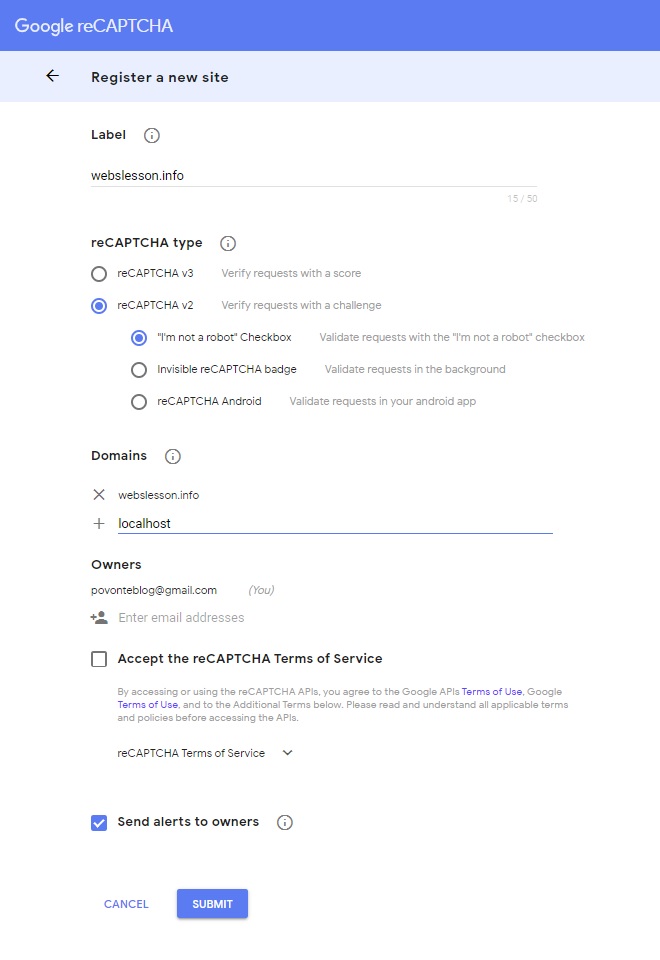
In first step we want to get the Google recaptcha Site key and Secret key. So first we have to login into our Google account and then after https://www.google.com/recaptcha/admin/create and register your domain name in which website you want to add. So in below you image you can find data like label, reCAPTCHA type and domain name field. After filling this details, you have to click on submit button.

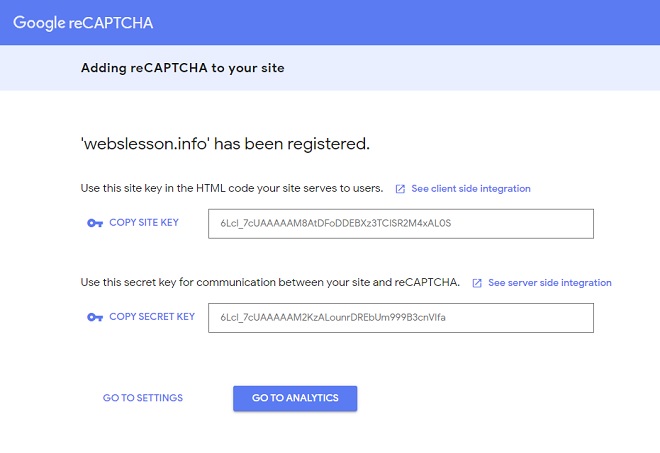
Once you have click on submit button, then you can get Google reCaptcha site key and secret key which you can see in below image. So you have to copy both key and store in safe place. We will use both key in Codeigniter for integrate Google reCaptcha with Codeigniter framework.

2. Define Base Url in Codeigniter
Before starting coding in Codeigniter framework, we have to first define base url of Codeigniter application. For define base url, we have to open application/config/ config.php and under that file you have define base url at $config['base_url'] in this variable.
$config['base_url'] = 'http://localhost/tutorial/codeigniter/';
3. Make Database Connection
For making MySql Database connection in Codeigniter framework, we have to open application/config/database.php file and under this file we have to define Mysql Database configuration.
$active_group = 'default';
$query_builder = TRUE;

$db['default'] = array(
	'dsn'	=> '',
	'hostname' => 'localhost',
	'username' => 'root',
	'password' => '',
	'database' => 'testing',
	'dbdriver' => 'mysqli',
	'dbprefix' => '',
	'pconnect' => FALSE,
	'db_debug' => (ENVIRONMENT !== 'production'),
	'cache_on' => FALSE,
	'cachedir' => '',
	'char_set' => 'utf8',
	'dbcollat' => 'utf8_general_ci',
	'swap_pre' => '',
	'encrypt' => FALSE,
	'compress' => FALSE,
	'stricton' => FALSE,
	'failover' => array(),
	'save_queries' => TRUE
);
4. Make Table in Mysql Database
After making Mysql database connection in Codeigniter framework, next we want to create table in Mysql database. So for create table in Mysql database, we have to run following SQL script in phpMyAdmin and it will make sample_data table will create in Mysql database.
--
-- Table structure for table `sample_data`
--

CREATE TABLE `sample_data` (
  `id` int(10) NOT NULL,
  `first_name` varchar(250) NOT NULL,
  `last_name` varchar(250) NOT NULL,
  `age` varchar(30) NOT NULL,
  `gender` varchar(30) NOT NULL
) ENGINE=InnoDB DEFAULT CHARSET=latin1;

--
-- Indexes for table `sample_data`
--
ALTER TABLE `sample_data`
  ADD PRIMARY KEY (`id`);

--
-- AUTO_INCREMENT for dumped tables
--

--
-- AUTO_INCREMENT for table `sample_data`
--
ALTER TABLE `sample_data`
  MODIFY `id` int(10) NOT NULL AUTO_INCREMENT, AUTO_INCREMENT=1;
5. Create Controller in Codeigniter
Codeigniter is a MVC model based framework and under this framework Controllers class has been used for handle http request. So for handle Google reCaptcha validation here we have create application/controllers/Captcha.php file and under this class file we have make following method.
__construct() - This magic method will execute code when object of this class has been created and it will load session library and captcha model class under this class. So we can use both class mehtod under this class.
index() - This is root method of this class and it will display views/captcha.php file html content on web page.
validate() - This method has been received form data from client side and under this method firs it has been check g-recaptcha-response variable value has been set or not. If this variable value is set then only it will execute other code. This variable has been generated by Google reCaptcha site key. And then after for check at server side it has use Secret key and send request reCaptcha api for get response regarding user has give proper answer or not. If from reCaptcha api success variable value has been received that means user has pass google recaptcha validation and then after data will be inserted into Mysql database. So here without Google reCaptcha validation data will not be insert into our system.
application/controllers/Captcha.php
<?php
defined('BASEPATH') OR exit('No direct script access allowed');

class Captcha extends CI_Controller {

	public function __construct()
	{
		parent::__construct();
		$this->load->library('session');
		$this->load->model('captcha_model');
	}

	function index()
	{
		$this->load->view('captcha');
	}

	function validate()
	{
		$captcha_response = trim($this->input->post('g-recaptcha-response'));

		if($captcha_response != '')
		{
			$keySecret = '6LefzNYZAAAAABWAiYy2_X2OiBSZkXdT7K-OoaKW';

			$check = array(
				'secret'		=>	$keySecret,
				'response'		=>	$this->input->post('g-recaptcha-response')
			);

			$startProcess = curl_init();

			curl_setopt($startProcess, CURLOPT_URL, "https://www.google.com/recaptcha/api/siteverify");

			curl_setopt($startProcess, CURLOPT_POST, true);

			curl_setopt($startProcess, CURLOPT_POSTFIELDS, http_build_query($check));

			curl_setopt($startProcess, CURLOPT_SSL_VERIFYPEER, false);

			curl_setopt($startProcess, CURLOPT_RETURNTRANSFER, true);

			$receiveData = curl_exec($startProcess);

			$finalResponse = json_decode($receiveData, true);

			if($finalResponse['success'])
			{
				$storeData = array(
					'first_name'	=>	$this->input->post('first_name'),
					'last_name'		=>	$this->input->post('last_name'),
					'age'			=>	$this->input->post('age'),
					'gender'		=>	$this->input->post('gender')
				);

				$this->captcha_model->insert($storeData);

				$this->session->set_flashdata('success_message', 'Data Stored Successfully');

				redirect('captcha');
			}
			else
			{
				$this->session->set_flashdata('message', 'Validation Fail Try Again');
				redirect('captcha');
			}
		}
		else
		{
			$this->session->set_flashdata('message', 'Validation Fail Try Again');

			redirect('captcha');
		}
	}

}

?>
6. Create Models class in Codeigniter
In Codeigniter models class has been used for perform database related operation and models chass has been created in application/models directory. In this tutorial, we have create Captcha_models.php class file and under this file we have make insert() method which has been used for insert data into Mysql table.
application/models/Captcha_models.php
<?php

class Captcha_model extends CI_Model
{
	function insert($data)
	{
		$this->db->insert('sample_data', $data);
	}
}
7. Create Views file in Codeigniter
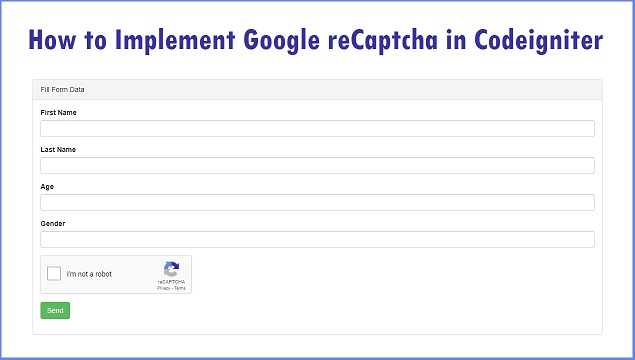
Views file has been used for display HTML output in brwoser under this Codeigniter framework and here we have create application/views/captcha.php file. Under this file we have make one html form for get data from user table and for create Google reCaptcha under this form we have create one division tag with class=g-recaptcha and at under this tag we have add data-sitekey and under this attirbute value we have to define Google reCaptcha site key. So by define this site key it will generate Google reCaptcha wiget under this form.
application/views/captcha.php
<html>
<head>
    <title>How to Implement Google reCaptcha in Codeigniter</title>

    <script src="https://ajax.googleapis.com/ajax/libs/jquery/2.2.0/jquery.min.js"></script>
    <link rel="stylesheet" href="https://maxcdn.bootstrapcdn.com/bootstrap/3.3.6/css/bootstrap.min.css" />
    <script src="https://maxcdn.bootstrapcdn.com/bootstrap/3.3.6/js/bootstrap.min.js"></script>
    <script src='https://www.google.com/recaptcha/api.js'></script>
</head>
<body>
    <div class="container box">
        <br />
        <h2 align="center"><b>How to Implement Google reCaptcha in Codeigniter</b></h2>
        <br />
        <div class="panel panel-default">
            <div class="panel-heading">Fill Form Data</div>
            <div class="panel-body">
                <?php
                if($this->session->flashdata('message'))
                {
                ?>
                    <div class="alert alert-danger">
                        <?php
                        echo $this->session->flashdata('message');
                        ?>
                    </div>
                <?php
                }

                if($this->session->flashdata('success_message'))
                {
                ?>
                    <div class="alert alert-success">
                        <?php
                        echo $this->session->flashdata('success_message');
                        ?>
                    </div>
                <?php
                }
                ?>
                <form method="post" action="<?php echo base_url(); ?>captcha/validate">
                    <div class="form-group">
                        <label>First Name</label>
                        <input type="text" name="first_name" class="form-control" />
                    </div>
                    <div class="form-group">
                        <label>Last Name</label>
                        <input type="text" name="last_name" class="form-control" />
                    </div>
                    <div class="form-group">
                        <label>Age</label>
                        <input type="text" name="age" class="form-control" />
                    </div>
                    <div class="form-group">
                        <label>Gender</label>
                        <input type="text" name="gender" class="form-control" />
                    </div>
                    <div class="form-group">
                        <div class="g-recaptcha" data-sitekey="6LefzNYZAAAAAIeoFhVYj3T5BoCEo1Yja5DvCRxP"></div>
                    </div>
                    <div class="form-group">
                        <input type="submit" name="send" class="btn btn-success" value="Send" />
                    </div>
                </form>
            </div>
        </div>
    </div>
</body>
</html>
So, this is complete step by step process for integrate Google reCaptcha under this Codeigniter application and reduce spam entry in your website. This is because without pass Google reCaptcha validation, data will not be entered into our database. So it will reduce spam attack in our website. If you have any query then you can ask in comment box we will reply on your comment regarding your query.