Showing posts with label dependent select boxes. Show all posts

Thursday, 16 April 2020

Dynamic Dependent Select Box with Search Option in PHP using jQuery Ajax


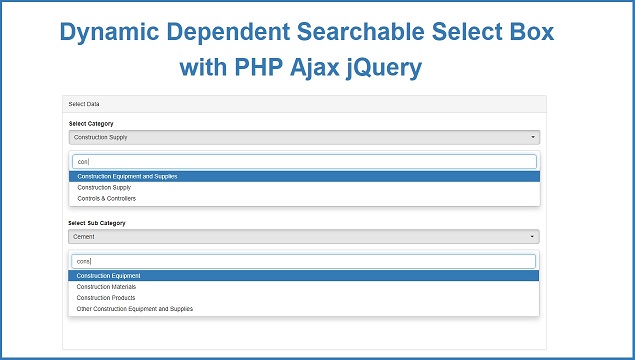
With this post we have come with unique topic like How can we make Dynamic Dependent Select box with Searching option with PHP script using jQuery and Ajax. We have seen many tutorial on simple dynamic dependent drop download list box with PHP script using ajax. So in simple dynamic select box, for select option we have to scroll select box for select particular option, and after select particular option, then other select box which data has been depend on the value which we have select parent select box. But in Dynamic dependent select box with searching option, user has not scroll select box, but they have to enter value in search box, which they want to select from select box and other dependent select box will be fill with data and from that select box user can also enter search query for select option. So this is main benefits of dynamic dependent select box with search option.

For make dynamic dependent select box with search option, here we have use Bootstrap Select plugin. Bootstrap select plugin is a jquery plugin and by using this plugin we can create select box and menus by using Bootstrap library and this plugin will add extra feature like live search, multiple selection of option, customize select box style, and select or deselect all option in select box. If you have use Bootstrap library in your web development then you can easily use this plugin for make dynamic dependent select box with search option.

After convert simple select box into searchable select box by using Bootstrap select plugin. Now for convert that searchable select box into dynamic select box. So here we will use PHP script for fill dynamic data into this searchable select box. After this we want to make dynamic dependent searchable select box, for this here we have use Ajax. So by using Ajax child select box will be filled with data after selecting value from parent select box. Below you can find complete source code for how to make dynamic dependent select box with search option in PHP by using jQuery and Ajax.


Source Code


Database


--
-- Table structure for table `tbl_industry`
--

CREATE TABLE `tbl_industry` (
  `industry_id` int(11) NOT NULL,
  `industry_name` varchar(250) NOT NULL
) ENGINE=InnoDB DEFAULT CHARSET=latin1;

-- --------------------------------------------------------

--
-- Table structure for table `tbl_sub_industry`
--

CREATE TABLE `tbl_sub_industry` (
  `sub_industry_id` int(11) NOT NULL,
  `industry_id` int(11) NOT NULL,
  `sub_industry_name` varchar(250) NOT NULL
) ENGINE=InnoDB DEFAULT CHARSET=latin1;

--
-- Indexes for dumped tables
--

--
-- Indexes for table `tbl_industry`
--
ALTER TABLE `tbl_industry`
  ADD PRIMARY KEY (`industry_id`);

--
-- Indexes for table `tbl_sub_industry`
--
ALTER TABLE `tbl_sub_industry`
  ADD PRIMARY KEY (`sub_industry_id`),
  ADD KEY `industry_id` (`industry_id`);

--
-- AUTO_INCREMENT for dumped tables
--

--
-- AUTO_INCREMENT for table `tbl_industry`
--
ALTER TABLE `tbl_industry`
  MODIFY `industry_id` int(11) NOT NULL AUTO_INCREMENT, AUTO_INCREMENT=78;

--
-- AUTO_INCREMENT for table `tbl_sub_industry`
--
ALTER TABLE `tbl_sub_industry`
  MODIFY `sub_industry_id` int(11) NOT NULL AUTO_INCREMENT, AUTO_INCREMENT=4414;


index.php


<!DOCTYPE html>
<html>
  <head>
    <title>Dynamic Dependent Searchable Select Box with PHP Ajax jQuery</title>
    <script src="https://cdnjs.cloudflare.com/ajax/libs/jquery/3.3.1/jquery.js"></script>
    <link rel="stylesheet" href="https://maxcdn.bootstrapcdn.com/bootstrap/3.3.6/css/bootstrap.min.css" />
    <script src="https://maxcdn.bootstrapcdn.com/bootstrap/3.3.7/js/bootstrap.min.js"></script>
    <link rel="stylesheet" href="https://cdnjs.cloudflare.com/ajax/libs/bootstrap-select/1.12.2/css/bootstrap-select.min.css">
    <script src="https://cdnjs.cloudflare.com/ajax/libs/bootstrap-select/1.12.2/js/bootstrap-select.min.js"></script>
  </head>
  <body>
    <br />
    <div class="container">
      <h3 align="center">Dynamic Dependent Searchable Select Box with PHP Ajax jQuery</h3>
      <br />
      <div class="panel panel-default">
        <div class="panel-heading">Select Data</div>
        <div class="panel-body">
          <div class="form-group">
            <label>Select Category</label>
            <select name="category_item" id="category_item" class="form-control input-lg" data-live-search="true" title="Select Category">

            </select>
          </div>
          <div class="form-group">
            <label>Select Sub Category</label>
            <select name="sub_category_item" id="sub_category_item" class="form-control input-lg" data-live-search="true" title="Select Sub Category">

            </select>
          </div>
        </div>
      </div>
    </div>
  </body>
</html>

<script>
$(document).ready(function(){

  $('#category_item').selectpicker();

  $('#sub_category_item').selectpicker();

  load_data('category_data');

  function load_data(type, category_id = '')
  {
    $.ajax({
      url:"load_data.php",
      method:"POST",
      data:{type:type, category_id:category_id},
      dataType:"json",
      success:function(data)
      {
        var html = '';
        for(var count = 0; count < data.length; count++)
        {
          html += '<option value="'+data[count].id+'">'+data[count].name+'</option>';
        }
        if(type == 'category_data')
        {
          $('#category_item').html(html);
          $('#category_item').selectpicker('refresh');
        }
        else
        {
          $('#sub_category_item').html(html);
          $('#sub_category_item').selectpicker('refresh');
        }
      }
    })
  }

  $(document).on('change', '#category_item', function(){
    var category_id = $('#category_item').val();
    load_data('sub_category_data', category_id);
  });
  
});
</script>


load_data.php


<?php

$connect = new PDO("mysql:host=localhost;dbname=testing", "root", "");

if(isset($_POST["type"]))
{
 if($_POST["type"] == "category_data")
 {
  $query = "
  SELECT * FROM tbl_industry 
  ORDER BY industry_name ASC
  ";
  $statement = $connect->prepare($query);
  $statement->execute();
  $data = $statement->fetchAll();
  foreach($data as $row)
  {
   $output[] = array(
    'id'  => $row["industry_id"],
    'name'  => $row["industry_name"]
   );
  }
  echo json_encode($output);
 }
 else
 {
  $query = "
  SELECT * FROM tbl_sub_industry 
  WHERE industry_id = '".$_POST["category_id"]."' 
  ORDER BY sub_industry_name ASC
  ";
  $statement = $connect->prepare($query);
  $statement->execute();
  $data = $statement->fetchAll();
  foreach($data as $row)
  {
   $output[] = array(
    'id'  => $row["sub_industry_id"],
    'name'  => $row["sub_industry_name"]
   );
  }
  echo json_encode($output);
 }
}

?>
Monday, 16 September 2019

Add or Remove Dynamic Dependent Select Box using jQuery with PHP Ajax

Part - 1


Part - 2


Part - 3


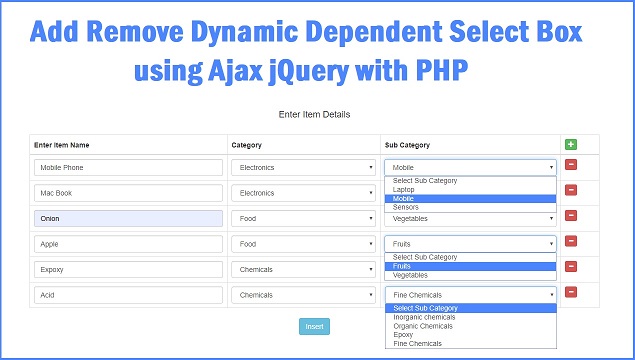
This is one more post on Add or Remove Input field, but now here we will discuss, how to Add or Remove Dynamic Dependent Select Box input field by using jQuery and How to insert Multiple input field data into Mysql table by using PHP with Ajax. Dynamic Dependent Select box or Drop down list box means child select box data must be depend on the value of select in parent select box. When we have change the value of parent select box then child select box data will be automatically change.

In some of our previous tutorial, we have already discuss how to Add or remove text box input field using jQuery with Ajax and PHP and we have also seen how to add or remove dynamic select box input field data using jQuery Ajax and PHP. But now question arise how to insert multiple form data with field like dynamic dependent select box. For this type of data we have to use add or remove input field using jQuery.

Currently, we have seen in PHP web development, in many event in which we want to insert multiple data into mysql database. Then at that time we would to require add or remove input fields concept. This feature has been used mainly used for multiple data insert into mysql table. But suppose in multiple data, we want to process dynamic dependent select box data, then at that time one question arise can we solve the problem of processing of multiple dynamic dependent select box data with add or remove input field concept. Below you can find complete source code for add or remove dynamic dependent select box using jquery and insert multiple input fields data using ajax with php.


Source Code


Mysql Table Stucture


--
-- Database: `testing`
--

-- --------------------------------------------------------

--
-- Table structure for table `tbl_category`
--

CREATE TABLE `tbl_category` (
  `category_id` int(11) NOT NULL,
  `category_name` varchar(200) NOT NULL,
  `parent_category_id` int(11) NOT NULL
) ENGINE=InnoDB DEFAULT CHARSET=latin1;

--
-- Dumping data for table `tbl_category`
--

INSERT INTO `tbl_category` (`category_id`, `category_name`, `parent_category_id`) VALUES
(2, 'Chemicals', 0),
(3, 'Inorganic chemicals', 2),
(4, 'Organic Chemicals', 2),
(5, 'Electronics', 0),
(6, 'Laptop', 5),
(7, 'Dell', 6),
(8, 'i3 Processor', 7),
(9, 'i5 Processors', 7),
(10, 'i7 Processors', 7),
(11, 'Epoxy', 2),
(12, 'Fine Chemicals', 2),
(13, 'Mobile', 5),
(14, 'Sensors', 5),
(15, 'Food', 0),
(16, 'Textile', 0),
(17, 'Fruits', 15),
(18, 'Vegetables', 15),
(19, 'Safety Shoes', 16),
(20, 'Uniform', 16);

--
-- Indexes for dumped tables
--

--
-- Indexes for table `tbl_category`
--
ALTER TABLE `tbl_category`
  ADD PRIMARY KEY (`category_id`);

--
-- AUTO_INCREMENT for dumped tables
--

--
-- AUTO_INCREMENT for table `tbl_category`
--
ALTER TABLE `tbl_category`
  MODIFY `category_id` int(11) NOT NULL AUTO_INCREMENT, AUTO_INCREMENT=21;

-------

--
-- Table structure for table `items`
--

CREATE TABLE `items` (
  `item_id` int(11) NOT NULL,
  `item_name` varchar(250) NOT NULL,
  `item_category_id` int(11) NOT NULL,
  `item_sub_category_id` int(11) NOT NULL
) ENGINE=InnoDB DEFAULT CHARSET=latin1;

--
-- Indexes for table `items`
--
ALTER TABLE `items`
  ADD PRIMARY KEY (`item_id`);

--
-- AUTO_INCREMENT for dumped tables
--

--
-- AUTO_INCREMENT for table `items`
--
ALTER TABLE `items`
  MODIFY `item_id` int(11) NOT NULL AUTO_INCREMENT, AUTO_INCREMENT=10;


database_connection.php


<?php

//database_connection.php

$connect = new PDO("mysql:host=localhost; dbname=testing;", "root", "");

function fill_select_box($connect, $category_id)
{
 $query = "
  SELECT * FROM tbl_category 
  WHERE parent_category_id = '".$category_id."'
 ";

 $statement = $connect->prepare($query);

 $statement->execute();

 $result = $statement->fetchAll();

 $output = '';

 foreach($result as $row)
 {
  $output .= '<option value="'.$row["category_id"].'">'.$row["category_name"].'</option>';
 }

 return $output;
}

?>


index.php


<?php

//index.php

include('database_connection.php');

?>

<!DOCTYPE html>
<html>
  <head>
    <title>Add Remove Dynamic Dependent Select Box using Ajax jQuery with PHP</title>
    <script src="https://ajax.googleapis.com/ajax/libs/jquery/3.1.0/jquery.min.js"></script>
    <link rel="stylesheet" href="https://maxcdn.bootstrapcdn.com/bootstrap/3.3.6/css/bootstrap.min.css" />
    <script src="https://maxcdn.bootstrapcdn.com/bootstrap/3.3.7/js/bootstrap.min.js"></script>
  </head>
  <body>
    <br />
    <div class="container">
      <h3 align="center">Add Remove Dynamic Dependent Select Box using Ajax jQuery with PHP</h3>
      <br />
      <h4 align="center">Enter Item Details</h4>
      <br />
      <form method="post" id="insert_form">
        <div class="table-repsonsive">
          <span id="error"></span>
          <table class="table table-bordered" id="item_table">
            <thead>
              <tr>
                <th>Enter Item Name</th>
                <th>Category</th>
                <th>Sub Category</th>
                <th><button type="button" name="add" class="btn btn-success btn-xs add"><span class="glyphicon glyphicon-plus"></span></button></th>
              </tr>
            </thead>
            <tbody></tbody>
          </table>
          <div align="center">
            <input type="submit" name="submit" class="btn btn-info" value="Insert" />
          </div>
        </div>
      </form>
    </div>
  </body>
</html>
<script>
    $(document).ready(function(){
      
      var count = 0;

      $(document).on('click', '.add', function(){
        count++;
        var html = '';
        html += '<tr>';
        html += '<td><input type="text" name="item_name[]" class="form-control item_name" /></td>';
        html += '<td><select name="item_category[]" class="form-control item_category" data-sub_category_id="'+count+'"><option value="">Select Category</option><?php echo fill_select_box($connect, "0"); ?></select></td>';
        html += '<td><select name="item_sub_category[]" class="form-control item_sub_category" id="item_sub_category'+count+'"><option value="">Select Sub Category</option></select></td>';
        html += '<td><button type="button" name="remove" class="btn btn-danger btn-xs remove"><span class="glyphicon glyphicon-minus"></span></button></td>';
        $('tbody').append(html);
      });

      $(document).on('click', '.remove', function(){
        $(this).closest('tr').remove();
      });

      $(document).on('change', '.item_category', function(){
        var category_id = $(this).val();
        var sub_category_id = $(this).data('sub_category_id');
        $.ajax({
          url:"fill_sub_category.php",
          method:"POST",
          data:{category_id:category_id},
          success:function(data)
          {
            var html = '<option value="">Select Sub Category</option>';
            html += data;
            $('#item_sub_category'+sub_category_id).html(html);
          }
        })
      });

      $('#insert_form').on('submit', function(event){
        event.preventDefault();
        var error = '';
        $('.item_name').each(function(){
          var count = 1;
          if($(this).val() == '')
          {
            error += '<p>Enter Item name at '+count+' Row</p>';
            return false;
          }
          count = count + 1;
        });

        $('.item_category').each(function(){
          var count = 1;

          if($(this).val() == '')
          {
            error += '<p>Select Item Category at '+count+' row</p>';
            return false;
          }

          count = count + 1;

        });

        $('.item_sub_category').each(function(){

          var count = 1;

          if($(this).val() == '')
          {
            error += '<p>Select Item Sub category '+count+' Row</p> ';
            return false;
          }

          count = count + 1;

        });

        var form_data = $(this).serialize();

        if(error == '')
        {
          $.ajax({
            url:"insert.php",
            method:"POST",
            data:form_data,
            success:function(data)
            {
              if(data == 'ok')
              {
                $('#item_table').find('tr:gt(0)').remove();
                $('#error').html('<div class="alert alert-success">Item Details Saved</div>');
              }
            }
          });
        }
        else
        {
          $('#error').html('<div class="alert alert-danger">'+error+'</div>');
        }

      });
      
    });
</script>


fill_sub_category.php


<?php

//fill_sub_category.php

include('database_connection.php');

echo fill_select_box($connect, $_POST["category_id"]);

?>


insert.php


<?php

//insert.php;

if(isset($_POST["item_name"]))
{
 include('database_connection.php');

 for($count = 0; $count < count($_POST["item_name"]); $count++)
 {
  $data = array(
   ':item_name'   => $_POST["item_name"][$count],
   ':item_category_id'  => $_POST["item_category"][$count],
   ':item_sub_category_id' => $_POST["item_sub_category"][$count]
  );

  $query = "
   INSERT INTO items 
       (item_name, item_category_id, item_sub_category_id) 
       VALUES (:item_name, :item_category_id, :item_sub_category_id)
  ";

  $statement = $connect->prepare($query);

  $statement->execute($data);
 }

 echo 'ok';
}


?>


Thursday, 26 April 2018

Multi Select Dynamic Dependent Select box using PHP Ajax


Hi, In this post we have implement multi select dynamic dropdown list box by using PHP with Ajax. Dynamic dependent select box means child select box data has been depend on value of parent select box. But this is single option dropdown list box and in which we can select only single option and based on selected option value it will load data in child load. But in web development we want to required to select multiple option from select box and based on that selected option we want to load data related to selected multiple option in child selectbox. For this we have make this tutorial.

For make multi select dynamic dependent select box using PHP with Ajax, we have use Bootstrap Multiselect plugin. This is a plugin for jQuery and Bootstrap which allows the user to select multiple options by checked on checkboxes. Here we will make multiple select dropdown listbox by using Bootstrap Multiselect plugin. Here we will make three different multi select dropdown listbox. So, when page has been load into browser then only first level select box has been filled with data and both child select box has been blank, so when we have select option from first selectbox option then selected of multiple option value, it will load data into second level category data which connected with value of first level category value with out refresh of web page. Same way when we have select multiple option from second level category option, then in third level category dropdown will be filled with data on the basis on selection of option from second level dropdown list. This way it this script will work.

Here we have use simple PHP script with Ajax and for make multiple selection dropdown listbox we have use Bootstrap Multiselect plugin. If you have know single selection dynamic dependent selectbox then you get better idea regarding this tutorial. In which we can select multiple option in parent select box and child dropdown listbox will be filled with data based on value of option selection in parent select box.


Source Code


database_connection.php


<?php

//database_connection.php

$connect = new PDO('mysql:host=localhost;dbname=test', 'root', '');

?>


index.php


<?php

//index.php

include('database_connection.php');

$query = "
SELECT * FROM first_level_category 
ORDER BY first_level_category_name ASC
";

$statement = $connect->prepare($query);

$statement->execute();

$result = $statement->fetchAll();

?>
<!DOCTYPE html>
<html>
 <head>
  <title>Bootstrap Multi Select Dynamic Dependent Select box using PHP Ajax </title>
  <script src="https://ajax.googleapis.com/ajax/libs/jquery/3.1.0/jquery.min.js"></script>  
  <link rel="stylesheet" href="https://maxcdn.bootstrapcdn.com/bootstrap/3.3.6/css/bootstrap.min.css" />
  <script src="https://maxcdn.bootstrapcdn.com/bootstrap/3.3.5/js/bootstrap.min.js"></script>
  <script src="https://cdnjs.cloudflare.com/ajax/libs/bootstrap-multiselect/0.9.13/js/bootstrap-multiselect.js"></script>
  <link rel="stylesheet" href="https://cdnjs.cloudflare.com/ajax/libs/bootstrap-multiselect/0.9.13/css/bootstrap-multiselect.css" />
 </head>
 <body>
  <br />
  <div class="container">
   <h2 align="center">Multi Select Dynamic Dependent Select box using PHP Ajax</h2>
   <br /><br />
   <div style="width: 500px; margin:0 auto">
    <div class="form-group">
     <label>First Level Category</label><br />
     <select id="first_level" name="first_level[]" multiple class="form-control">
     <?php
     foreach($result as $row)
     {
      echo '<option value="'.$row["first_level_category_id"].'">'.$row["first_level_category_name"].'</option>';
     }
     ?>
     </select>
    </div>
    <div class="form-group">
     <label>Second Level Category</label><br />
     <select id="second_level" name="second_level[]" multiple class="form-control">

     </select>
    </div>
    <div class="form-group">
     <label>Third Level Category</label><br />
     <select id="third_level" name="third_level[]" multiple class="form-control">

     </select>
    </div>
   </div>
  </div>
 </body>
</html>
<script>
$(document).ready(function(){

 $('#first_level').multiselect({
  nonSelectedText:'Select First Level Category',
  buttonWidth:'400px',
  onChange:function(option, checked){
   $('#second_level').html('');
   $('#second_level').multiselect('rebuild');
   $('#third_level').html('');
   $('#third_level').multiselect('rebuild');
   var selected = this.$select.val();
   if(selected.length > 0)
   {
    $.ajax({
     url:"fetch_second_level_category.php",
     method:"POST",
     data:{selected:selected},
     success:function(data)
     {
      $('#second_level').html(data);
      $('#second_level').multiselect('rebuild');
     }
    })
   }
  }
 });

 $('#second_level').multiselect({
  nonSelectedText: 'Select Second Level Category',
  buttonWidth:'400px',
  onChange:function(option, checked)
  {
   $('#third_level').html('');
   $('#third_level').multiselect('rebuild');
   var selected = this.$select.val();
   if(selected.length > 0)
   {
    $.ajax({
     url:"fetch_third_level_category.php",
     method:"POST",
     data:{selected:selected},
     success:function(data)
     {
      $('#third_level').html(data);
      $('#third_level').multiselect('rebuild');
     }
    });
   }
  }
 });

 $('#third_level').multiselect({
  nonSelectedText: 'Select Third Level Category',
  buttonWidth:'400px'
 });

});
</script>


fetch_second_level_category.php


<?php

//fetch_second_level_category.php

include('database_connection.php');

if(isset($_POST["selected"]))
{
 $id = join("','", $_POST["selected"]);
 $query = "
 SELECT * FROM second_level_category 
 WHERE first_level_category_id IN ('".$id."')
 ";
 $statement = $connect->prepare($query);
 $statement->execute();
 $result = $statement->fetchAll();
 $output = '';
 foreach($result as $row)
 {
  $output .= '<option value="'.$row["second_level_category_id"].'">'.$row["second_level_category_name"].'</option>';
 }
 echo $output;
}

?>


fetch_third_level_category.php


<?php

//fetch_third_level_category.php

include('database_connection.php');

if(isset($_POST["selected"]))
{
 $id = join("','", $_POST["selected"]);
 $query = "
 SELECT * FROM third_level_category 
 WHERE second_level_category_id IN ('".$id."')
 "; 
 $statement = $connect->prepare($query);
 $statement->execute();
 $result = $statement->fetchAll();
 $output = '';
 foreach($result as $row)
 {
  $output .= '<option value="'.$row["third_level_category_id"].'">'.$row["third_level_category_name"].'</option>';
 }
 echo $output;
}


?>


Database


--
-- Database: `test`
--

-- --------------------------------------------------------

--
-- Table structure for table `first_level_category`
--

CREATE TABLE `first_level_category` (
  `first_level_category_id` int(11) NOT NULL,
  `first_level_category_name` varchar(255) NOT NULL
) ENGINE=InnoDB DEFAULT CHARSET=latin1;

--
-- Dumping data for table `first_level_category`
--

INSERT INTO `first_level_category` (`first_level_category_id`, `first_level_category_name`) VALUES
(1, 'Electronics & Electrical'),
(2, 'Apparel & Garments'),
(3, 'Automobile Parts'),
(4, 'Construction Material');

-- --------------------------------------------------------

--
-- Table structure for table `second_level_category`
--

CREATE TABLE `second_level_category` (
  `second_level_category_id` int(11) NOT NULL,
  `first_level_category_id` int(11) NOT NULL,
  `second_level_category_name` varchar(300) NOT NULL
) ENGINE=InnoDB DEFAULT CHARSET=latin1;

--
-- Dumping data for table `second_level_category`
--

INSERT INTO `second_level_category` (`second_level_category_id`, `first_level_category_id`, `second_level_category_name`) VALUES
(1, 1, 'Audio Video Equipment'),
(2, 1, 'Water Heater'),
(3, 1, 'Air Conditioner'),
(4, 2, 'Children Clothing'),
(5, 2, 'Women Wear'),
(6, 2, 'Men Wear'),
(7, 3, 'Auto Parts'),
(8, 3, 'Auto Accessories'),
(9, 3, 'Auto Electronics'),
(10, 4, 'Tiles'),
(11, 4, 'Plywood'),
(12, 4, 'Sanitaryware');

-- --------------------------------------------------------

--
-- Table structure for table `third_level_category`
--

CREATE TABLE `third_level_category` (
  `third_level_category_id` int(11) NOT NULL,
  `second_level_category_id` int(11) NOT NULL,
  `third_level_category_name` varchar(300) NOT NULL
) ENGINE=InnoDB DEFAULT CHARSET=latin1;

--
-- Dumping data for table `third_level_category`
--

INSERT INTO `third_level_category` (`third_level_category_id`, `second_level_category_id`, `third_level_category_name`) VALUES
(1, 1, 'Mini FM Radio'),
(2, 1, 'LCD TV'),
(3, 1, 'Music Player'),
(4, 2, 'Solar Water Heater'),
(5, 2, 'Thermic Fluid Heater'),
(6, 2, 'Portable Water Heater'),
(7, 3, 'Portable Air Conditioner'),
(8, 3, 'Air Conditioner Part'),
(9, 3, 'Commercial Air Conditioner'),
(10, 4, 'Baby Clothes'),
(11, 4, 'Kids Garments'),
(12, 4, 'Designer Clothes'),
(13, 5, 'Legging'),
(14, 5, 'Ladies Fashion Garments'),
(15, 5, 'Gown Dresses'),
(16, 6, 'Men Formal Wear'),
(17, 6, 'Mens Kurtas'),
(18, 6, 'Mens Lower'),
(19, 7, 'Car Shock Absorber'),
(20, 7, 'Glass Cleaning Wiper'),
(21, 7, 'Steering Lock'),
(22, 8, 'Grille Light'),
(23, 8, 'Automobile Couplings'),
(24, 8, 'Motorcycle Helmet'),
(25, 9, 'Car Audio System'),
(26, 9, 'Car Lcd'),
(27, 9, 'Car Stereos'),
(28, 10, 'Stone Tiles'),
(29, 10, 'Zig Zag Tiles'),
(30, 10, 'Granite Tiles'),
(31, 11, 'Flexible Plywood'),
(32, 11, 'Designer Plywood'),
(33, 11, 'Commercial Plywood'),
(34, 12, 'Brass Sanitary Fittings'),
(35, 12, 'Porcelain Toilet'),
(36, 12, 'Lavatory Basin'),
(37, 12, 'Kitchen Sink');

--
-- Indexes for dumped tables
--

--
-- Indexes for table `first_level_category`
--
ALTER TABLE `first_level_category`
  ADD PRIMARY KEY (`first_level_category_id`);

--
-- Indexes for table `second_level_category`
--
ALTER TABLE `second_level_category`
  ADD PRIMARY KEY (`second_level_category_id`);

--
-- Indexes for table `third_level_category`
--
ALTER TABLE `third_level_category`
  ADD PRIMARY KEY (`third_level_category_id`);

--
-- AUTO_INCREMENT for dumped tables
--

--
-- AUTO_INCREMENT for table `first_level_category`
--
ALTER TABLE `first_level_category`
  MODIFY `first_level_category_id` int(11) NOT NULL AUTO_INCREMENT, AUTO_INCREMENT=5;

--
-- AUTO_INCREMENT for table `second_level_category`
--
ALTER TABLE `second_level_category`
  MODIFY `second_level_category_id` int(11) NOT NULL AUTO_INCREMENT, AUTO_INCREMENT=13;

--
-- AUTO_INCREMENT for table `third_level_category`
--
ALTER TABLE `third_level_category`
  MODIFY `third_level_category_id` int(11) NOT NULL AUTO_INCREMENT, AUTO_INCREMENT=38;

Tuesday, 16 May 2017

JSON - Dynamic Dependent Select Box using Jquery and Ajax


How to make dynamic dependent dropdown list by using Jquery Ajax and JSON. Using of dependent select box will be a require functionality if there is a dependency between options of the select box fields. Dependent dropdown list box when we have select in parent select box then it will allowed to refresh child select box data without refresh of web page. In this post we have JSON file to store data for fill parent and child select box and in that file we have give relationship between Parent data with Child. We will use Ajax Jquery for fetch data from JSON file and filled parent select box. This is a very simple Ajax JQuery code hope you like this.

The dynamic dependent dropdown list box is most required for Country State and City select box. So in this post we have made relational select box of Country State City by using JQuery Ajax with JSON array data file. Here first we will filled Parent select box of with Country list fetch from JSON file by using Ajax with JQuery. And here State dependent dynamic select box data has been filled based on selection of parent Country select box. And Same way City dynamic dependent select box data has been filled based on selection of it's parent State drop down list box. That means State data has been related with selection of Country and list of City data has been related with selection of state. So here when we have select any country from select box then here it will fetch state data which are related with particular country and same way when we have select any state from select box then it will fetch city data which are related with particular state by using Ajax JQuery without refresh of web page.

In one of our previous web tutorial we have already made dynamic dependent select box by using JQuery Ajax with PHP and Mysql. But here we have do something different here we have fetch data from JSON file by JQuery Ajax and here we have not make any PHP sever side script for fetch data from Mysql database but we have use JSON File and in that we have store country state city data with state data related with country and city data has been related with state. So here we have make simple light weight dynamic dependent dropdown list box because here we have perform all operation at client side not perform any server script for fetch data from Database. So if you have developed any website and in that you have to require any dynamic dependent select box then you can choose this type JSON with Ajax JQuery instead of using PHP Mysql with Aajx JQuery.

So lastly this is our simple web tutorial on How to make dynamic dependent select by using JSON with Ajax Jquery. I hope you have enjoy this post. Please keep visit out website for Accessing Web tutorial with Source Code and online demo.


Source Code


<!DOCTYPE html>
<html>
 <head>
  <title>Webslesson Tutorial | JSON - Dynamic Dependent Dropdown List using Jquery and Ajax</title>
  <script src="https://ajax.googleapis.com/ajax/libs/jquery/3.1.0/jquery.min.js"></script>
  <link rel="stylesheet" href="https://maxcdn.bootstrapcdn.com/bootstrap/3.3.6/css/bootstrap.min.css" />
  <script src="https://maxcdn.bootstrapcdn.com/bootstrap/3.3.7/js/bootstrap.min.js"></script>
 </head>
 <body>
  <br /><br />
  <div class="container" style="width:600px;">
   <h2 align="center">JSON - Dynamic Dependent Dropdown List using Jquery and Ajax</h2><br /><br />
   <select name="country" id="country" class="form-control input-lg">
    <option value="">Select country</option>
   </select>
   <br />
   <select name="state" id="state" class="form-control input-lg">
    <option value="">Select state</option>
   </select>
   <br />
   <select name="city" id="city" class="form-control input-lg">
    <option value="">Select city</option>
   </select>
  </div>
 </body>
</html>

<script>
$(document).ready(function(){

 load_json_data('country');

 function load_json_data(id, parent_id)
 {
  var html_code = '';
  $.getJSON('country_state_city.json', function(data){

   html_code += '<option value="">Select '+id+'</option>';
   $.each(data, function(key, value){
    if(id == 'country')
    {
     if(value.parent_id == '0')
     {
      html_code += '<option value="'+value.id+'">'+value.name+'</option>';
     }
    }
    else
    {
     if(value.parent_id == parent_id)
     {
      html_code += '<option value="'+value.id+'">'+value.name+'</option>';
     }
    }
   });
   $('#'+id).html(html_code);
  });

 }

 $(document).on('change', '#country', function(){
  var country_id = $(this).val();
  if(country_id != '')
  {
   load_json_data('state', country_id);
  }
  else
  {
   $('#state').html('<option value="">Select state</option>');
   $('#city').html('<option value="">Select city</option>');
  }
 });
 $(document).on('change', '#state', function(){
  var state_id = $(this).val();
  if(state_id != '')
  {
   load_json_data('city', state_id);
  }
  else
  {
   $('#city').html('<option value="">Select city</option>');
  }
 });
});
</script>


country_state_city.json


[
 {
  "id":"1",
  "name":"USA",
  "parent_id":"0"
 }, 
 {
  "id":"2",
  "name":"Canada",
  "parent_id":"0"
 }, 
 {
  "id":"3",
  "name":"Australia",
  "parent_id":"0"
 }, 
 {
  "id":"4",
  "name":"New York",
  "parent_id":"1"
 }, 
 {
  "id":"5",
  "name":"Alabama",
  "parent_id":"1"
 }, 
 {
  "id":"6",
  "name":"California",
  "parent_id":"1"
 }, 
 {
  "id":"7",
  "name":"Ontario",
  "parent_id":"2"
 }, 
 {
  "id":"8",
  "name":"British Columbia",
  "parent_id":"2"
 }, 
 {
  "id":"9",
  "name":"New South Wales",
  "parent_id":"3"
 }, 
 {
  "id":"10",
  "name":"Queensland",
  "parent_id":"3"
 }, 
 {
  "id":"11",
  "name":"New York city",
  "parent_id":"4"
 }, 
 {
  "id":"12",
  "name":"Buffalo",
  "parent_id":"4"
 }, 
 {
  "id":"13",
  "name":"Albany",
  "parent_id":"4"
 }, 
 {
  "id":"14",
  "name":"Birmingham",
  "parent_id":"5"
 }, 
 {
  "id":"15",
  "name":"Montgomery",
  "parent_id":"5"
 }, 
 {
  "id":"16",
  "name":"Huntsville",
  "parent_id":"5"
 }, 
 {
  "id":"17",
  "name":"Los Angeles",
  "parent_id":"6"
 }, 
 {
  "id":"18",
  "name":"San Francisco",
  "parent_id":"6"
 }, 
 {
  "id":"19",
  "name":"San Diego",
  "parent_id":"6"
 }, 
 {
  "id":"20",
  "name":"Toronto",
  "parent_id":"7"
 }, 
 {
  "id":"21",
  "name":"Ottawa",
  "parent_id":"7"
 }, 
 {
  "id":"22",
  "name":"Vancouver",
  "parent_id":"8"
 }, 
 {
  "id":"23",
  "name":"Victoria",
  "parent_id":"8"
 }, 
 {
  "id":"24",
  "name":"Sydney",
  "parent_id":"9"
 }, 
 {
  "id":"25",
  "name":"Newcastle",
  "parent_id":"9"
 }, 
 {
  "id":"26",
  "name":"City of Brisbane",
  "parent_id":"10"
 }, 
 {
  "id":"27",
  "name":"Gold Coast",
  "parent_id":"10"
 }
]