
Part - 1
Part - 2
Part - 3
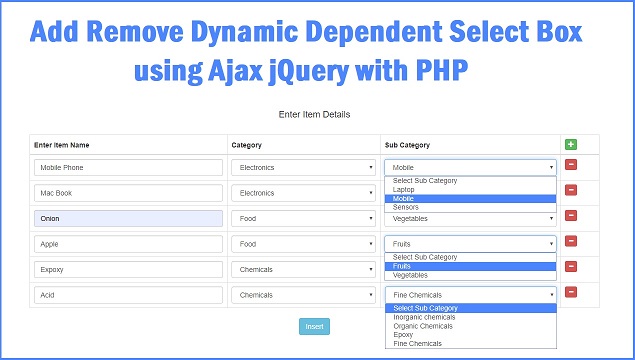
This is one more post on Add or Remove Input field, but now here we will discuss, how to Add or Remove Dynamic Dependent Select Box input field by using jQuery and How to insert Multiple input field data into Mysql table by using PHP with Ajax. Dynamic Dependent Select box or Drop down list box means child select box data must be depend on the value of select in parent select box. When we have change the value of parent select box then child select box data will be automatically change.
In some of our previous tutorial, we have already discuss how to Add or remove text box input field using jQuery with Ajax and PHP and we have also seen how to add or remove dynamic select box input field data using jQuery Ajax and PHP. But now question arise how to insert multiple form data with field like dynamic dependent select box. For this type of data we have to use add or remove input field using jQuery.
Currently, we have seen in PHP web development, in many event in which we want to insert multiple data into mysql database. Then at that time we would to require add or remove input fields concept. This feature has been used mainly used for multiple data insert into mysql table. But suppose in multiple data, we want to process dynamic dependent select box data, then at that time one question arise can we solve the problem of processing of multiple dynamic dependent select box data with add or remove input field concept. Below you can find complete source code for add or remove dynamic dependent select box using jquery and insert multiple input fields data using ajax with php.
Source Code
Mysql Table Stucture
--
-- Database: `testing`
--

-- --------------------------------------------------------

--
-- Table structure for table `tbl_category`
--

CREATE TABLE `tbl_category` (
  `category_id` int(11) NOT NULL,
  `category_name` varchar(200) NOT NULL,
  `parent_category_id` int(11) NOT NULL
) ENGINE=InnoDB DEFAULT CHARSET=latin1;

--
-- Dumping data for table `tbl_category`
--

INSERT INTO `tbl_category` (`category_id`, `category_name`, `parent_category_id`) VALUES
(2, 'Chemicals', 0),
(3, 'Inorganic chemicals', 2),
(4, 'Organic Chemicals', 2),
(5, 'Electronics', 0),
(6, 'Laptop', 5),
(7, 'Dell', 6),
(8, 'i3 Processor', 7),
(9, 'i5 Processors', 7),
(10, 'i7 Processors', 7),
(11, 'Epoxy', 2),
(12, 'Fine Chemicals', 2),
(13, 'Mobile', 5),
(14, 'Sensors', 5),
(15, 'Food', 0),
(16, 'Textile', 0),
(17, 'Fruits', 15),
(18, 'Vegetables', 15),
(19, 'Safety Shoes', 16),
(20, 'Uniform', 16);

--
-- Indexes for dumped tables
--

--
-- Indexes for table `tbl_category`
--
ALTER TABLE `tbl_category`
  ADD PRIMARY KEY (`category_id`);

--
-- AUTO_INCREMENT for dumped tables
--

--
-- AUTO_INCREMENT for table `tbl_category`
--
ALTER TABLE `tbl_category`
  MODIFY `category_id` int(11) NOT NULL AUTO_INCREMENT, AUTO_INCREMENT=21;

-------

--
-- Table structure for table `items`
--

CREATE TABLE `items` (
  `item_id` int(11) NOT NULL,
  `item_name` varchar(250) NOT NULL,
  `item_category_id` int(11) NOT NULL,
  `item_sub_category_id` int(11) NOT NULL
) ENGINE=InnoDB DEFAULT CHARSET=latin1;

--
-- Indexes for table `items`
--
ALTER TABLE `items`
  ADD PRIMARY KEY (`item_id`);

--
-- AUTO_INCREMENT for dumped tables
--

--
-- AUTO_INCREMENT for table `items`
--
ALTER TABLE `items`
  MODIFY `item_id` int(11) NOT NULL AUTO_INCREMENT, AUTO_INCREMENT=10;
database_connection.php
<?php

//database_connection.php

$connect = new PDO("mysql:host=localhost; dbname=testing;", "root", "");

function fill_select_box($connect, $category_id)
{
 $query = "
  SELECT * FROM tbl_category
  WHERE parent_category_id = '".$category_id."'
 ";

 $statement = $connect->prepare($query);

 $statement->execute();

 $result = $statement->fetchAll();

 $output = '';

 foreach($result as $row)
 {
  $output .= '<option value="'.$row["category_id"].'">'.$row["category_name"].'</option>';
 }

 return $output;
}

?>
index.php
<?php

//index.php

include('database_connection.php');

?>

<!DOCTYPE html>
<html>
  <head>
    <title>Add Remove Dynamic Dependent Select Box using Ajax jQuery with PHP</title>
    <script src="https://ajax.googleapis.com/ajax/libs/jquery/3.1.0/jquery.min.js"></script>
    <link rel="stylesheet" href="https://maxcdn.bootstrapcdn.com/bootstrap/3.3.6/css/bootstrap.min.css" />
    <script src="https://maxcdn.bootstrapcdn.com/bootstrap/3.3.7/js/bootstrap.min.js"></script>
  </head>
  <body>
    <br />
    <div class="container">
      <h3 align="center">Add Remove Dynamic Dependent Select Box using Ajax jQuery with PHP</h3>
      <br />
      <h4 align="center">Enter Item Details</h4>
      <br />
      <form method="post" id="insert_form">
        <div class="table-repsonsive">
          <span id="error"></span>
          <table class="table table-bordered" id="item_table">
            <thead>
              <tr>
                <th>Enter Item Name</th>
                <th>Category</th>
                <th>Sub Category</th>
                <th><button type="button" name="add" class="btn btn-success btn-xs add"><span class="glyphicon glyphicon-plus"></span></button></th>
              </tr>
            </thead>
            <tbody></tbody>
          </table>
          <div align="center">
            <input type="submit" name="submit" class="btn btn-info" value="Insert" />
          </div>
        </div>
      </form>
    </div>
  </body>
</html>
<script>
    $(document).ready(function(){

      var count = 0;

      $(document).on('click', '.add', function(){
        count++;
        var html = '';
        html += '<tr>';
        html += '<td><input type="text" name="item_name[]" class="form-control item_name" /></td>';
        html += '<td><select name="item_category[]" class="form-control item_category" data-sub_category_id="'+count+'"><option value="">Select Category</option><?php echo fill_select_box($connect, "0"); ?></select></td>';
        html += '<td><select name="item_sub_category[]" class="form-control item_sub_category" id="item_sub_category'+count+'"><option value="">Select Sub Category</option></select></td>';
        html += '<td><button type="button" name="remove" class="btn btn-danger btn-xs remove"><span class="glyphicon glyphicon-minus"></span></button></td>';
        $('tbody').append(html);
      });

      $(document).on('click', '.remove', function(){
        $(this).closest('tr').remove();
      });

      $(document).on('change', '.item_category', function(){
        var category_id = $(this).val();
        var sub_category_id = $(this).data('sub_category_id');
        $.ajax({
          url:"fill_sub_category.php",
          method:"POST",
          data:{category_id:category_id},
          success:function(data)
          {
            var html = '<option value="">Select Sub Category</option>';
            html += data;
            $('#item_sub_category'+sub_category_id).html(html);
          }
        })
      });

      $('#insert_form').on('submit', function(event){
        event.preventDefault();
        var error = '';
        $('.item_name').each(function(){
          var count = 1;
          if($(this).val() == '')
          {
            error += '<p>Enter Item name at '+count+' Row</p>';
            return false;
          }
          count = count + 1;
        });

        $('.item_category').each(function(){
          var count = 1;

          if($(this).val() == '')
          {
            error += '<p>Select Item Category at '+count+' row</p>';
            return false;
          }

          count = count + 1;

        });

        $('.item_sub_category').each(function(){

          var count = 1;

          if($(this).val() == '')
          {
            error += '<p>Select Item Sub category '+count+' Row</p> ';
            return false;
          }

          count = count + 1;

        });

        var form_data = $(this).serialize();

        if(error == '')
        {
          $.ajax({
            url:"insert.php",
            method:"POST",
            data:form_data,
            success:function(data)
            {
              if(data == 'ok')
              {
                $('#item_table').find('tr:gt(0)').remove();
                $('#error').html('<div class="alert alert-success">Item Details Saved</div>');
              }
            }
          });
        }
        else
        {
          $('#error').html('<div class="alert alert-danger">'+error+'</div>');
        }

      });

    });
</script>
fill_sub_category.php
<?php

//fill_sub_category.php

include('database_connection.php');

echo fill_select_box($connect, $_POST["category_id"]);

?>
insert.php
<?php

//insert.php;

if(isset($_POST["item_name"]))
{
 include('database_connection.php');

 for($count = 0; $count < count($_POST["item_name"]); $count++)
 {
  $data = array(
   ':item_name'   => $_POST["item_name"][$count],
   ':item_category_id'  => $_POST["item_category"][$count],
   ':item_sub_category_id' => $_POST["item_sub_category"][$count]
  );

  $query = "
   INSERT INTO items
       (item_name, item_category_id, item_sub_category_id)
       VALUES (:item_name, :item_category_id, :item_sub_category_id)
  ";

  $statement = $connect->prepare($query);

  $statement->execute($data);
 }

 echo 'ok';
}


?>
