Showing posts with label dependent select boxes php. Show all posts

Thursday, 16 April 2020

Dynamic Dependent Select Box with Search Option in PHP using jQuery Ajax


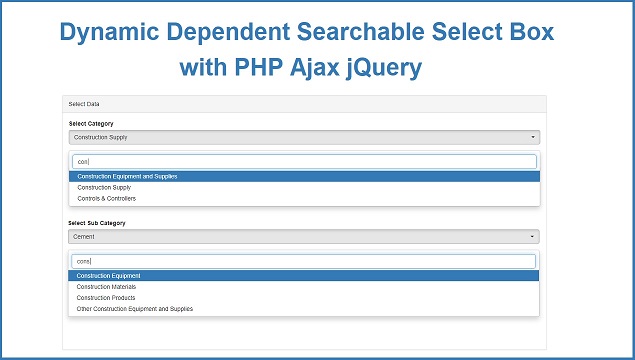
With this post we have come with unique topic like How can we make Dynamic Dependent Select box with Searching option with PHP script using jQuery and Ajax. We have seen many tutorial on simple dynamic dependent drop download list box with PHP script using ajax. So in simple dynamic select box, for select option we have to scroll select box for select particular option, and after select particular option, then other select box which data has been depend on the value which we have select parent select box. But in Dynamic dependent select box with searching option, user has not scroll select box, but they have to enter value in search box, which they want to select from select box and other dependent select box will be fill with data and from that select box user can also enter search query for select option. So this is main benefits of dynamic dependent select box with search option.

For make dynamic dependent select box with search option, here we have use Bootstrap Select plugin. Bootstrap select plugin is a jquery plugin and by using this plugin we can create select box and menus by using Bootstrap library and this plugin will add extra feature like live search, multiple selection of option, customize select box style, and select or deselect all option in select box. If you have use Bootstrap library in your web development then you can easily use this plugin for make dynamic dependent select box with search option.

After convert simple select box into searchable select box by using Bootstrap select plugin. Now for convert that searchable select box into dynamic select box. So here we will use PHP script for fill dynamic data into this searchable select box. After this we want to make dynamic dependent searchable select box, for this here we have use Ajax. So by using Ajax child select box will be filled with data after selecting value from parent select box. Below you can find complete source code for how to make dynamic dependent select box with search option in PHP by using jQuery and Ajax.


Source Code


Database


--
-- Table structure for table `tbl_industry`
--

CREATE TABLE `tbl_industry` (
  `industry_id` int(11) NOT NULL,
  `industry_name` varchar(250) NOT NULL
) ENGINE=InnoDB DEFAULT CHARSET=latin1;

-- --------------------------------------------------------

--
-- Table structure for table `tbl_sub_industry`
--

CREATE TABLE `tbl_sub_industry` (
  `sub_industry_id` int(11) NOT NULL,
  `industry_id` int(11) NOT NULL,
  `sub_industry_name` varchar(250) NOT NULL
) ENGINE=InnoDB DEFAULT CHARSET=latin1;

--
-- Indexes for dumped tables
--

--
-- Indexes for table `tbl_industry`
--
ALTER TABLE `tbl_industry`
  ADD PRIMARY KEY (`industry_id`);

--
-- Indexes for table `tbl_sub_industry`
--
ALTER TABLE `tbl_sub_industry`
  ADD PRIMARY KEY (`sub_industry_id`),
  ADD KEY `industry_id` (`industry_id`);

--
-- AUTO_INCREMENT for dumped tables
--

--
-- AUTO_INCREMENT for table `tbl_industry`
--
ALTER TABLE `tbl_industry`
  MODIFY `industry_id` int(11) NOT NULL AUTO_INCREMENT, AUTO_INCREMENT=78;

--
-- AUTO_INCREMENT for table `tbl_sub_industry`
--
ALTER TABLE `tbl_sub_industry`
  MODIFY `sub_industry_id` int(11) NOT NULL AUTO_INCREMENT, AUTO_INCREMENT=4414;


index.php


<!DOCTYPE html>
<html>
  <head>
    <title>Dynamic Dependent Searchable Select Box with PHP Ajax jQuery</title>
    <script src="https://cdnjs.cloudflare.com/ajax/libs/jquery/3.3.1/jquery.js"></script>
    <link rel="stylesheet" href="https://maxcdn.bootstrapcdn.com/bootstrap/3.3.6/css/bootstrap.min.css" />
    <script src="https://maxcdn.bootstrapcdn.com/bootstrap/3.3.7/js/bootstrap.min.js"></script>
    <link rel="stylesheet" href="https://cdnjs.cloudflare.com/ajax/libs/bootstrap-select/1.12.2/css/bootstrap-select.min.css">
    <script src="https://cdnjs.cloudflare.com/ajax/libs/bootstrap-select/1.12.2/js/bootstrap-select.min.js"></script>
  </head>
  <body>
    <br />
    <div class="container">
      <h3 align="center">Dynamic Dependent Searchable Select Box with PHP Ajax jQuery</h3>
      <br />
      <div class="panel panel-default">
        <div class="panel-heading">Select Data</div>
        <div class="panel-body">
          <div class="form-group">
            <label>Select Category</label>
            <select name="category_item" id="category_item" class="form-control input-lg" data-live-search="true" title="Select Category">

            </select>
          </div>
          <div class="form-group">
            <label>Select Sub Category</label>
            <select name="sub_category_item" id="sub_category_item" class="form-control input-lg" data-live-search="true" title="Select Sub Category">

            </select>
          </div>
        </div>
      </div>
    </div>
  </body>
</html>

<script>
$(document).ready(function(){

  $('#category_item').selectpicker();

  $('#sub_category_item').selectpicker();

  load_data('category_data');

  function load_data(type, category_id = '')
  {
    $.ajax({
      url:"load_data.php",
      method:"POST",
      data:{type:type, category_id:category_id},
      dataType:"json",
      success:function(data)
      {
        var html = '';
        for(var count = 0; count < data.length; count++)
        {
          html += '<option value="'+data[count].id+'">'+data[count].name+'</option>';
        }
        if(type == 'category_data')
        {
          $('#category_item').html(html);
          $('#category_item').selectpicker('refresh');
        }
        else
        {
          $('#sub_category_item').html(html);
          $('#sub_category_item').selectpicker('refresh');
        }
      }
    })
  }

  $(document).on('change', '#category_item', function(){
    var category_id = $('#category_item').val();
    load_data('sub_category_data', category_id);
  });
  
});
</script>


load_data.php


<?php

$connect = new PDO("mysql:host=localhost;dbname=testing", "root", "");

if(isset($_POST["type"]))
{
 if($_POST["type"] == "category_data")
 {
  $query = "
  SELECT * FROM tbl_industry 
  ORDER BY industry_name ASC
  ";
  $statement = $connect->prepare($query);
  $statement->execute();
  $data = $statement->fetchAll();
  foreach($data as $row)
  {
   $output[] = array(
    'id'  => $row["industry_id"],
    'name'  => $row["industry_name"]
   );
  }
  echo json_encode($output);
 }
 else
 {
  $query = "
  SELECT * FROM tbl_sub_industry 
  WHERE industry_id = '".$_POST["category_id"]."' 
  ORDER BY sub_industry_name ASC
  ";
  $statement = $connect->prepare($query);
  $statement->execute();
  $data = $statement->fetchAll();
  foreach($data as $row)
  {
   $output[] = array(
    'id'  => $row["sub_industry_id"],
    'name'  => $row["sub_industry_name"]
   );
  }
  echo json_encode($output);
 }
}

?>

Thursday, 26 April 2018

Multi Select Dynamic Dependent Select box using PHP Ajax


Hi, In this post we have implement multi select dynamic dropdown list box by using PHP with Ajax. Dynamic dependent select box means child select box data has been depend on value of parent select box. But this is single option dropdown list box and in which we can select only single option and based on selected option value it will load data in child load. But in web development we want to required to select multiple option from select box and based on that selected option we want to load data related to selected multiple option in child selectbox. For this we have make this tutorial.

For make multi select dynamic dependent select box using PHP with Ajax, we have use Bootstrap Multiselect plugin. This is a plugin for jQuery and Bootstrap which allows the user to select multiple options by checked on checkboxes. Here we will make multiple select dropdown listbox by using Bootstrap Multiselect plugin. Here we will make three different multi select dropdown listbox. So, when page has been load into browser then only first level select box has been filled with data and both child select box has been blank, so when we have select option from first selectbox option then selected of multiple option value, it will load data into second level category data which connected with value of first level category value with out refresh of web page. Same way when we have select multiple option from second level category option, then in third level category dropdown will be filled with data on the basis on selection of option from second level dropdown list. This way it this script will work.

Here we have use simple PHP script with Ajax and for make multiple selection dropdown listbox we have use Bootstrap Multiselect plugin. If you have know single selection dynamic dependent selectbox then you get better idea regarding this tutorial. In which we can select multiple option in parent select box and child dropdown listbox will be filled with data based on value of option selection in parent select box.


Source Code


database_connection.php


<?php

//database_connection.php

$connect = new PDO('mysql:host=localhost;dbname=test', 'root', '');

?>


index.php


<?php

//index.php

include('database_connection.php');

$query = "
SELECT * FROM first_level_category 
ORDER BY first_level_category_name ASC
";

$statement = $connect->prepare($query);

$statement->execute();

$result = $statement->fetchAll();

?>
<!DOCTYPE html>
<html>
 <head>
  <title>Bootstrap Multi Select Dynamic Dependent Select box using PHP Ajax </title>
  <script src="https://ajax.googleapis.com/ajax/libs/jquery/3.1.0/jquery.min.js"></script>  
  <link rel="stylesheet" href="https://maxcdn.bootstrapcdn.com/bootstrap/3.3.6/css/bootstrap.min.css" />
  <script src="https://maxcdn.bootstrapcdn.com/bootstrap/3.3.5/js/bootstrap.min.js"></script>
  <script src="https://cdnjs.cloudflare.com/ajax/libs/bootstrap-multiselect/0.9.13/js/bootstrap-multiselect.js"></script>
  <link rel="stylesheet" href="https://cdnjs.cloudflare.com/ajax/libs/bootstrap-multiselect/0.9.13/css/bootstrap-multiselect.css" />
 </head>
 <body>
  <br />
  <div class="container">
   <h2 align="center">Multi Select Dynamic Dependent Select box using PHP Ajax</h2>
   <br /><br />
   <div style="width: 500px; margin:0 auto">
    <div class="form-group">
     <label>First Level Category</label><br />
     <select id="first_level" name="first_level[]" multiple class="form-control">
     <?php
     foreach($result as $row)
     {
      echo '<option value="'.$row["first_level_category_id"].'">'.$row["first_level_category_name"].'</option>';
     }
     ?>
     </select>
    </div>
    <div class="form-group">
     <label>Second Level Category</label><br />
     <select id="second_level" name="second_level[]" multiple class="form-control">

     </select>
    </div>
    <div class="form-group">
     <label>Third Level Category</label><br />
     <select id="third_level" name="third_level[]" multiple class="form-control">

     </select>
    </div>
   </div>
  </div>
 </body>
</html>
<script>
$(document).ready(function(){

 $('#first_level').multiselect({
  nonSelectedText:'Select First Level Category',
  buttonWidth:'400px',
  onChange:function(option, checked){
   $('#second_level').html('');
   $('#second_level').multiselect('rebuild');
   $('#third_level').html('');
   $('#third_level').multiselect('rebuild');
   var selected = this.$select.val();
   if(selected.length > 0)
   {
    $.ajax({
     url:"fetch_second_level_category.php",
     method:"POST",
     data:{selected:selected},
     success:function(data)
     {
      $('#second_level').html(data);
      $('#second_level').multiselect('rebuild');
     }
    })
   }
  }
 });

 $('#second_level').multiselect({
  nonSelectedText: 'Select Second Level Category',
  buttonWidth:'400px',
  onChange:function(option, checked)
  {
   $('#third_level').html('');
   $('#third_level').multiselect('rebuild');
   var selected = this.$select.val();
   if(selected.length > 0)
   {
    $.ajax({
     url:"fetch_third_level_category.php",
     method:"POST",
     data:{selected:selected},
     success:function(data)
     {
      $('#third_level').html(data);
      $('#third_level').multiselect('rebuild');
     }
    });
   }
  }
 });

 $('#third_level').multiselect({
  nonSelectedText: 'Select Third Level Category',
  buttonWidth:'400px'
 });

});
</script>


fetch_second_level_category.php


<?php

//fetch_second_level_category.php

include('database_connection.php');

if(isset($_POST["selected"]))
{
 $id = join("','", $_POST["selected"]);
 $query = "
 SELECT * FROM second_level_category 
 WHERE first_level_category_id IN ('".$id."')
 ";
 $statement = $connect->prepare($query);
 $statement->execute();
 $result = $statement->fetchAll();
 $output = '';
 foreach($result as $row)
 {
  $output .= '<option value="'.$row["second_level_category_id"].'">'.$row["second_level_category_name"].'</option>';
 }
 echo $output;
}

?>


fetch_third_level_category.php


<?php

//fetch_third_level_category.php

include('database_connection.php');

if(isset($_POST["selected"]))
{
 $id = join("','", $_POST["selected"]);
 $query = "
 SELECT * FROM third_level_category 
 WHERE second_level_category_id IN ('".$id."')
 "; 
 $statement = $connect->prepare($query);
 $statement->execute();
 $result = $statement->fetchAll();
 $output = '';
 foreach($result as $row)
 {
  $output .= '<option value="'.$row["third_level_category_id"].'">'.$row["third_level_category_name"].'</option>';
 }
 echo $output;
}


?>


Database


--
-- Database: `test`
--

-- --------------------------------------------------------

--
-- Table structure for table `first_level_category`
--

CREATE TABLE `first_level_category` (
  `first_level_category_id` int(11) NOT NULL,
  `first_level_category_name` varchar(255) NOT NULL
) ENGINE=InnoDB DEFAULT CHARSET=latin1;

--
-- Dumping data for table `first_level_category`
--

INSERT INTO `first_level_category` (`first_level_category_id`, `first_level_category_name`) VALUES
(1, 'Electronics & Electrical'),
(2, 'Apparel & Garments'),
(3, 'Automobile Parts'),
(4, 'Construction Material');

-- --------------------------------------------------------

--
-- Table structure for table `second_level_category`
--

CREATE TABLE `second_level_category` (
  `second_level_category_id` int(11) NOT NULL,
  `first_level_category_id` int(11) NOT NULL,
  `second_level_category_name` varchar(300) NOT NULL
) ENGINE=InnoDB DEFAULT CHARSET=latin1;

--
-- Dumping data for table `second_level_category`
--

INSERT INTO `second_level_category` (`second_level_category_id`, `first_level_category_id`, `second_level_category_name`) VALUES
(1, 1, 'Audio Video Equipment'),
(2, 1, 'Water Heater'),
(3, 1, 'Air Conditioner'),
(4, 2, 'Children Clothing'),
(5, 2, 'Women Wear'),
(6, 2, 'Men Wear'),
(7, 3, 'Auto Parts'),
(8, 3, 'Auto Accessories'),
(9, 3, 'Auto Electronics'),
(10, 4, 'Tiles'),
(11, 4, 'Plywood'),
(12, 4, 'Sanitaryware');

-- --------------------------------------------------------

--
-- Table structure for table `third_level_category`
--

CREATE TABLE `third_level_category` (
  `third_level_category_id` int(11) NOT NULL,
  `second_level_category_id` int(11) NOT NULL,
  `third_level_category_name` varchar(300) NOT NULL
) ENGINE=InnoDB DEFAULT CHARSET=latin1;

--
-- Dumping data for table `third_level_category`
--

INSERT INTO `third_level_category` (`third_level_category_id`, `second_level_category_id`, `third_level_category_name`) VALUES
(1, 1, 'Mini FM Radio'),
(2, 1, 'LCD TV'),
(3, 1, 'Music Player'),
(4, 2, 'Solar Water Heater'),
(5, 2, 'Thermic Fluid Heater'),
(6, 2, 'Portable Water Heater'),
(7, 3, 'Portable Air Conditioner'),
(8, 3, 'Air Conditioner Part'),
(9, 3, 'Commercial Air Conditioner'),
(10, 4, 'Baby Clothes'),
(11, 4, 'Kids Garments'),
(12, 4, 'Designer Clothes'),
(13, 5, 'Legging'),
(14, 5, 'Ladies Fashion Garments'),
(15, 5, 'Gown Dresses'),
(16, 6, 'Men Formal Wear'),
(17, 6, 'Mens Kurtas'),
(18, 6, 'Mens Lower'),
(19, 7, 'Car Shock Absorber'),
(20, 7, 'Glass Cleaning Wiper'),
(21, 7, 'Steering Lock'),
(22, 8, 'Grille Light'),
(23, 8, 'Automobile Couplings'),
(24, 8, 'Motorcycle Helmet'),
(25, 9, 'Car Audio System'),
(26, 9, 'Car Lcd'),
(27, 9, 'Car Stereos'),
(28, 10, 'Stone Tiles'),
(29, 10, 'Zig Zag Tiles'),
(30, 10, 'Granite Tiles'),
(31, 11, 'Flexible Plywood'),
(32, 11, 'Designer Plywood'),
(33, 11, 'Commercial Plywood'),
(34, 12, 'Brass Sanitary Fittings'),
(35, 12, 'Porcelain Toilet'),
(36, 12, 'Lavatory Basin'),
(37, 12, 'Kitchen Sink');

--
-- Indexes for dumped tables
--

--
-- Indexes for table `first_level_category`
--
ALTER TABLE `first_level_category`
  ADD PRIMARY KEY (`first_level_category_id`);

--
-- Indexes for table `second_level_category`
--
ALTER TABLE `second_level_category`
  ADD PRIMARY KEY (`second_level_category_id`);

--
-- Indexes for table `third_level_category`
--
ALTER TABLE `third_level_category`
  ADD PRIMARY KEY (`third_level_category_id`);

--
-- AUTO_INCREMENT for dumped tables
--

--
-- AUTO_INCREMENT for table `first_level_category`
--
ALTER TABLE `first_level_category`
  MODIFY `first_level_category_id` int(11) NOT NULL AUTO_INCREMENT, AUTO_INCREMENT=5;

--
-- AUTO_INCREMENT for table `second_level_category`
--
ALTER TABLE `second_level_category`
  MODIFY `second_level_category_id` int(11) NOT NULL AUTO_INCREMENT, AUTO_INCREMENT=13;

--
-- AUTO_INCREMENT for table `third_level_category`
--
ALTER TABLE `third_level_category`
  MODIFY `third_level_category_id` int(11) NOT NULL AUTO_INCREMENT, AUTO_INCREMENT=38;