Showing posts with label form validation. Show all posts

Saturday, 31 August 2019

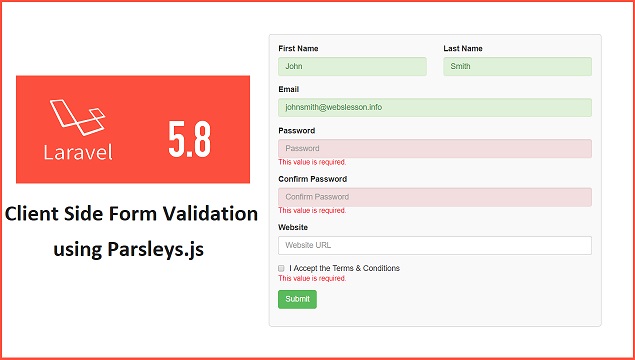
Front-end Form Validation using Parsleys.js in Laravel 5.8


Do you know why Form Validation is needed? This is because Validation of Form Data is required for prevent web application form entered invalid users data. If we have not perform form validation, then it will increase the our system security vulnerabilities. And there is increase the chances of attack of header injection, SQL injections or cross-site scripting.

Now What is Form validation, Form Validation means the check input data which has been submitted by the users of our system. There are two ways we can perform Form validation. One is Client Side Form validation and another one is server side Form Validation.

Here we have use Laravel 5.8 framework for web development. And here we will learn How can we validate user entered input data in our Laravel application at client side. For Validate users input data at client side, for this we have use Parsleys.js javascript library.

Parsley is the Javascript form validation library. By using this javascript library we can perform form validation at frontend that means it will validate form input data at client machine, if all input data has been valid then after it will send this data to server for do database operation. In this tutorial, we will seen how can we use Parsley.js library for client-side form validation in Laravel 5.8 application. Below you can find step by step process for validate form data in Laravel 5.8 application.

  • Download and Install Laravel 5.8 Framework
  • Make Database Connection in Laravel 5.8
  • Create Controller in Laravel 5.8
  • Create View Blade File in Laravel 5.8
  • Set Route in Laravel 5.8
  • Run Laravel 5.8 Application


Download and Install Laravel 5.8 Framework


If you has use Laravel for your Web Development, then first you have to download and install Laravel 5.8 application. For this you have to go to command prompt. And in command prompt first you have to go folder in which you want to download and install Laravel 5.8 framework. After this you have to run "composer" command, because Compose has maintain the laravel package. And after this you have write below command, it will download and install Laravel latest version in your local computer.


composer create-project --prefer-dist laravel/laravel form_validation


Make Database Connection in Laravel 5.8


After downloading and installing of Laravel framework, now we want to make database connection. For we have to open .env file and in this file we have to define Mysql Database configuration.


DB_CONNECTION=mysql
DB_HOST=localhost
DB_PORT=3306
DB_DATABASE=testing
DB_USERNAME=root
DB_PASSWORD=


Once you have make Mysql Database connection, now you have to make table in your Database, for this you have run following sql script. This script will make tbl_register table in your Mysql Database.


--
-- Table structure for table `tbl_register`
--

CREATE TABLE `tbl_register` (
  `register_id` int(11) NOT NULL,
  `first_name` varchar(150) NOT NULL,
  `last_name` varchar(150) NOT NULL,
  `email` varchar(150) NOT NULL,
  `password` varchar(150) NOT NULL,
  `website` varchar(150) NOT NULL
) ENGINE=InnoDB DEFAULT CHARSET=latin1;

--
-- Indexes for table `tbl_register`
--
ALTER TABLE `tbl_register`
  ADD PRIMARY KEY (`register_id`);

--
-- AUTO_INCREMENT for dumped tables
--

--
-- AUTO_INCREMENT for table `tbl_register`
--
ALTER TABLE `tbl_register`
  MODIFY `register_id` int(11) NOT NULL AUTO_INCREMENT, AUTO_INCREMENT=1;


Create Controller in Laravel 5.8


In Larave framework, you have to make controller for handle http reqest. In Laravel controller class has been store in app/Http/Controllers and here we have to make FormValidationController.php file. In controller we have write user DB; statement for perform Database side operation. Here we have make following method in controller.

index() - This is the root method of this Form Validation controller. It will load form_validation.blade.php file in browser for display output.

insert(Request $request) - This method has been used for insert data into Mysql table. This method has been received Ajax request from blade file for insert data and this method has give response to Ajax request in json format.

app/Http/Controllers/FormValidationController.php

<?php

namespace App\Http\Controllers;

use Illuminate\Http\Request;

use DB;

class FormValidationController extends Controller
{
    function index()
    {
     return view('form_validation');
    }

    function insert(Request $request)
    {
     if(request()->ajax())
     {
      $data = array(
       'first_name' => $request->get('first_name'),
       'last_name'  => $request->get('last_name'),
       'email'   => $request->get('email'),
       'password'  => $request->get('password'),
       'website'  => $request->get('website')
      );

      DB::table('tbl_register')->insert($data);

      return response()->json(['success' => 'Data Added']);
     }
    }
}


Create View Blade File in Laravel 5.8


Now we have come to main part of this tutorial. Here we have to make View Blade file in Laravel 5.8 framework, this file has been used for display html output file on web page. This file has been store in resources/view file. And here we have to make form_validation.blade.php file.

In this file we have imported jQuery Library, Bootstrap library and for form validation we have use Parsley.js javascript library also. For use Parsley.js library, you have to first import jQuery library also. Without jQuery library we cannot use Parsley.js library.Here we have make simple Registration form for perform form validation by using Parsley.js library. Below you can find parsley.js attribute which has been used for form validation in this post.


Parsley.js validators Description
required By using this attribute, it will add input file value if required for submit form data.
data-parsley-pattern="[a-zA-Z]+$" It will check input field value has been match with the define regular expression, if value not match it will trigger validation error.
data-parsley-type="email" This will check if input field value is valid email or not. If input field value is invalid email, then it will trigger validation error.
data-parsley-length="[8,16]" This validator check input field value length has been between define range, if length is not between define range then it will trigger error.
data-parsley-equalto="#password" This validator will check this input field value must be equal to value of input field with id password, if value is not match with define input field then it will trigger error.
data-parsley-trigger="keyup" This validator will trigger validation error on key up event.

Below you can find which Parsley.js library method here in this tutorial.

Parsley.js Method Description
$('#validate_form').parsley(); This method will initialize Parsley.js library on define form id.
$('#validate_form').parsley().isValid() This method will return true, if all form data has been proper.
$('#validate_form').parsley().reset(); This method will remove all formatting which has been generated by Parsley.js library.

After validating all form data, it will send Ajax request to Laravel controller insert() method.

resources/views/form_validation.blade.php

<html>
 <head>
  <meta name="viewport" content="width=device-width, initial-scale=1">
  <title>Laravel 5.8 - Client Side Form Validation using Parsleys.js</title>
  <script src="https://ajax.googleapis.com/ajax/libs/jquery/2.2.0/jquery.min.js"></script>
  <link rel="stylesheet" href="https://maxcdn.bootstrapcdn.com/bootstrap/3.3.6/css/bootstrap.min.css" />
  <script src="https://maxcdn.bootstrapcdn.com/bootstrap/3.3.6/js/bootstrap.min.js"></script>
  <script src="http://parsleyjs.org/dist/parsley.js"></script>
  <style>
  .box
  {
   width:100%;
   max-width:600px;
   background-color:#f9f9f9;
   border:1px solid #ccc;
   border-radius:5px;
   padding:16px;
   margin:0 auto;
  }
  input.parsley-success,
  select.parsley-success,
  textarea.parsley-success {
    color: #468847;
    background-color: #DFF0D8;
    border: 1px solid #D6E9C6;
  }

  input.parsley-error,
  select.parsley-error,
  textarea.parsley-error {
    color: #B94A48;
    background-color: #F2DEDE;
    border: 1px solid #EED3D7;
  }

  .parsley-errors-list {
    margin: 2px 0 3px;
    padding: 0;
    list-style-type: none;
    font-size: 0.9em;
    line-height: 0.9em;
    opacity: 0;

    transition: all .3s ease-in;
    -o-transition: all .3s ease-in;
    -moz-transition: all .3s ease-in;
    -webkit-transition: all .3s ease-in;
  }

  .parsley-errors-list.filled {
    opacity: 1;
  }
  
  .parsley-type, .parsley-required, .parsley-equalto, .parsley-pattern, .parsley-length{
   color:#ff0000;
  }
  
  </style>

 </head>
 <body>
  <div class="container">    
     <br />
     <h3 align="center">Laravel 5.8 - Client Side Form Validation using Parsleys.js</h3>
     <br />
     <div class="box">
    <form id="validate_form">

     @CSRF

     <div class="row">
      <div class="col-xs-6">
       <div class="form-group">
        <label>First Name</label>
        <input type="text" name="first_name" id="first_name" class="form-control" placeholder="Enter First Name" required data-parsley-pattern="[a-zA-Z]+$" data-parsley-trigger="keyup" />
       </div>
      </div>
      <div class="col-xs-6">
       <div class="form-group">
        <label>Last Name</label>
        <input type="text" name="last_name" id="last_name" class="form-control" placeholder="Enter Last Name" required data-parsley-pattern="[a-zA-Z]+$" data-parsley-trigger="keyup" />
       </div>
      </div>
     </div>
     <div class="form-group">
      <label>Email</label>
      <input type="text" name="email" id="email" class="form-control" placeholder="Email" required data-parsley-type="email" data-parsley-trigger="keyup" />
     </div>
     <div class="form-group">
      <label for="password">Password</label>
      <input type="password" name="password" id="password" class="form-control" placeholder="Password" required data-parsley-length="[8,16]" data-parsley-trigger="keyup" />
     </div>
     <div class="form-group">
      <label>Confirm Password</label>
      <input type="password" name="confirm_password" id="confirm_password" class="form-control" placeholder="Confirm Password" required data-parsley-equalto="#password" data-parsley-trigger="keyup" />
     </div>
     <div class="form-group">
      <label>Website</label>
      <input type="text" name="website" id="website" class="form-control" data-parsley-type="url" data-parsley-trigger="keyup" />
     </div>
     <div class="form-group">
      <div class="checkbox">
       <label> <input type="checkbox" name="check_rules" id="check_rules" required />I Accept the Terms & Conditions</label>
      </div>
     </div>
     <div class="form-group">
      <input type="submit" name="submit" id="submit" value="Submit" class="btn btn-success" />
     </div>

    </form>

   </div>
  </div>
 </body>
</html>
<script>
$(document).ready(function(){

 $('#validate_form').parsley();

 $('#validate_form').on('submit', function(event){
  event.preventDefault();

  if($('#validate_form').parsley().isValid())
  {
   $.ajax({
    url: '{{ route("form-validation.insert") }}',
    method:"POST",
    data:$(this).serialize(),
    dataType:"json",
    beforeSend:function()
    {
     $('#submit').attr('disabled', 'disabled');
     $('#submit').val('Submitting...');
    },
    success:function(data)
    {
     $('#validate_form')[0].reset();
     $('#validate_form').parsley().reset();
     $('#submit').attr('disabled', false);
     $('#submit').val('Submit');
     alert(data.success);
    }
   });
  }
 });

});
</script>


Set Route in Laravel 5.8


Once all code is ready, lastly we have to set the route of controller method. For this we have to open routes/web.php file.

routes/web.php

Route::get('form-validation', 'FormValidationController@index');

Route::post('form-validation/insert', 'FormValidationController@insert')->name('form-validation.insert');


Run Laravel 5.8 Application


For run Laravel application, we have to again go to command prompt and write following command.


php artisan serve


This command will start laravel server, it will provide us base url of our Laravel application. For run above tutorial, we have to type following url in your browser.


http://127.0.0.1:8000/form-validation


So, this way we can perform client-side or front-end side form validation by using Parsley.js library in Laravel 5.8 framework without write any line of code.

Wednesday, 27 February 2019

How to use jqBootstrapValidation for Validate Form with Ajax PHP


This one more Webslesson post on How to validate form data using jQuery plugin. Now in this post we have use jqBoostrapValidation plugin for validate form data and make spam free contact form with Ajax and PHP. In one of previous post, we have use parsleyjs for form data validation and submit form data using Ajax. Here also we will show you how to validate form data by using jqBootstraoValidation plugin and submit form data using Ajax with PHP.

jqBootstrapValidation is a jQuery plugin for validate bootstrap form data. It mainly display validation error in help-block of Bootstrap library class. It is a simple form validation plugin, which mainly used with Bootstrap library. If you have use Bootstrap library for your front end use, then it will help you in form validation. Because it has used Bootstrap library element as users type. Validation of Form data is a headache of every programmer, but if you have used bootstrap library, then this plugin will helpful to validate form data.

This plugin has used HTML5 validator attributes on html field, and it has used data attributes for display error. If you want to set any input, which data has required for submit form, then at that time you can simply used requred="required" attribute, then this plugin will directly scan this HTML5 attributes for validate that input field. Now question aris how can we display error of that validation, then in this plugin used data-validation-required-message attributes has been used for display required validation error.

After this suppose you want to validate email fields data, for this you have to just used input="email" this plugin will automatically generates error if email fields data in not in proper email format.

Same way, we want to validate mobile number in form field, then at that time we can use pattern attributes like pattern="^[0-9]{10}$" this pattern will validate mobile number which must be in number format with the length 10 digit if data is not in this format then it will display error. For display pattern validation error, this plugin has use data-validation-pattern-message this data attribute for display pattern mismatch validation error. If you want to get details documentation of this plugin, you can get here.


Source Code


index.php


<!DOCTYPE html>
<html>
 <head>
  <title>Contact Form Validation using jqBootstrapValidation with Ajax PHP</title>
  <link rel="stylesheet" href="https://maxcdn.bootstrapcdn.com/bootstrap/3.3.6/css/bootstrap.min.css" />
  <script src="https://ajax.googleapis.com/ajax/libs/jquery/2.2.0/jquery.min.js"></script>
        <script src="https://maxcdn.bootstrapcdn.com/bootstrap/3.3.6/js/bootstrap.min.js"></script>  
        <script src="https://cdnjs.cloudflare.com/ajax/libs/jqBootstrapValidation/1.3.6/jqBootstrapValidation.js"></script>
  <style>
  .box
  {
   max-width:600px;
   width:100%;
   margin: 0 auto;;
  }
        .form-group p
        {
            color:#a94442;
        }
  </style>
 </head>
 <body>
  <div class="container">
   <br />
   <h3 align="center">Contact Form Validation using jqBootstrapValidation with Ajax PHP</h3>
   <br />
   <form id="simple_form" novalidate="novalidate">

    <div class="control-group">
                    <div class="form-group mb-0 pb-2">
                        <input type="text" name="contact_name" id="contact_name" class="form-control form-control-lg" placeholder="Name" required="required" data-validation-required-message="Please enter your name." />
                        <p class="text-danger help-block"></p>
                    </div>
                </div>

                <div class="control-group">
                    <div class="form-group">
                        <input type="email" name="contact_email" id="contact_email" class="form-control form-control-lg" placeholder="Email Address" required="required" data-validation-required-message="Please enter your email address." />
                        <p class="text-danger help-block"></p>

                    </div>
                </div>

                <div class="control-group">
                    <div class="form-group">
                        <input type="tel" name="contact_mobile" id="contact_mobile" class="form-control form-control-lg" placeholder="Phone Number" required="required" data-validation-required-message="Please enter your phone number." pattern="^[0-9]{10}$" data-validation-pattern-message="10 digits needed" />
                        <p class="text-danger help-block"></p>

                    </div>
                </div>

                <div class="control-group">
                    <div class="form-group">
                        <textarea name="contact_message" id="contact_message" class="form-control form-control-lg" rows="5" placeholder="Message" required="required" data-validation-required-message="Please enter a message."></textarea>
                        <p class="text-danger help-block"></p>
                    </div>
                </div>
                <br>
                <div id="success"></div>
                <div class="form-group">
                 <button type="submit" class="btn btn-primary" id="send_button">Send</button>
                </div>
   </form>
  </div>
 </body>
</html>

<script>
$(document).ready(function(){
 
    $('#simple_form input, #simple_form textarea').jqBootstrapValidation({
     preventSubmit: true,
     submitSuccess: function($form, event){     
      event.preventDefault();
      $this = $('#send_button');
      $this.prop('disabled', true);
      var form_data = $("#simple_form").serialize();
      $.ajax({
       url:"send.php",
       method:"POST",
       data:form_data,
       success:function(){
        $('#success').html("<div class='alert alert-success'><strong>Your message has been sent. </strong></div>");
        $('#simple_form').trigger('reset');
       },
       error:function(){
        $('#success').html("<div class='alert alert-danger'>There is some error</div>");
        $('#simple_form').trigger('reset');
       },
       complete:function(){
        setTimeout(function(){
         $this.prop("disabled", false);
         $('#success').html('');
        }, 5000);
       }
      });
     },
    });

});
</script>


send.php


<?php

//send.php

if(isset($_POST["contact_name"]))
{
 require 'class/class.phpmailer.php';
 $mail = new PHPMailer;
 $mail->IsSMTP();
 $mail->Host = 'smtpout.secureserver.net';

 $mail->Port = '80';

 $mail->SMTPAuth = true;
 $mail->Username = 'xxxx';
 $mail->Password = 'xxxx'; 
 $mail->SMTPSecure = '';
 $mail->From = $_POST['contact_email'];
 $mail->FromName = $_POST['contact_name'];
 $mail->AddAddress('web-tutorial@programmer.net');
 $mail->WordWrap = 50;
 $mail->IsHTML(true);

 $mail->Subject = 'New Business Enquiry from ' . $_POST['contact_name'];
 $message_body = $_POST["contact_message"];
 $message_body .= '<p>With mobile number ' . $_POST["contact_mobile"] . '</p>';
 $mail->Body = $message_body;

 if($mail->Send())
 {
  echo 'Thank you for Contact Us';
 }
}

?>

This is complete step by process of how use jqBootstrapValidation library for validate form data with Ajax request and PHP script.


Thursday, 6 September 2018

Client Side Form Validation using Parsley.js with PHP Ajax


Validation of Form Data is a very time consuming task of any web developer. So, for reduce form validation task here we have make this tutorial in which we have describe PHP form validation by using Parsleys.js jQuery library. If you are web developer then you have know form validation has been done at server side and client side also or both side. At client side form validation we mainly use pure javascript or jQuery script and on server side form data validation we have used scripting language like PHP. If you have developed some big web application with multiple forms, then you have to write form validation code for each form and this form validation task will be boring and without form validation web application will not work properly and cannot give proper output of any task. Because if wrong type of data entered into system then will also give wrong output. So, Form validation is very required task in web application development.

For this form validation here we have use Parsleys.js Library has been use with PHP form for validate form data at client side. Parsley is a simple and light weight javascript library mainly for form validation. By using this library we can validate form data very easily and it will validate HTML input fields data without writing any lines of code. This form validation Library mainly use special DOM API with attribute for validate HTML form data. That validation are feature rich and we can easily implement into our form and also make some custom validation also.

Below you can find simple example of HTML form validation has been done by using Parsley.js with Ajax and PHP.


Source Code


Database


--
-- Database: `testing`
--

-- --------------------------------------------------------

--
-- Table structure for table `tbl_register`
--

CREATE TABLE `tbl_register` (
  `register_id` int(11) NOT NULL,
  `first_name` varchar(150) NOT NULL,
  `last_name` varchar(150) NOT NULL,
  `email` varchar(150) NOT NULL,
  `password` varchar(150) NOT NULL,
  `website` varchar(150) NOT NULL
) ENGINE=InnoDB DEFAULT CHARSET=latin1;

--
-- Indexes for dumped tables
--

--
-- Indexes for table `tbl_register`
--
ALTER TABLE `tbl_register`
  ADD PRIMARY KEY (`register_id`);

--
-- AUTO_INCREMENT for dumped tables
--

--
-- AUTO_INCREMENT for table `tbl_register`
--
ALTER TABLE `tbl_register`
  MODIFY `register_id` int(11) NOT NULL AUTO_INCREMENT;


index.php


<html>  
    <head>  
        <title>PHP Form Validation using Parsleys.js Library</title>  
        <link rel="stylesheet" href="https://maxcdn.bootstrapcdn.com/bootstrap/3.3.6/css/bootstrap.min.css" />  
        <script src="https://ajax.googleapis.com/ajax/libs/jquery/2.2.0/jquery.min.js"></script>
  <script src="http://parsleyjs.org/dist/parsley.js"></script>
    </head>
 <style>
 .box
 {
  width:100%;
  max-width:600px;
  background-color:#f9f9f9;
  border:1px solid #ccc;
  border-radius:5px;
  padding:16px;
  margin:0 auto;
 }
 input.parsley-success,
 select.parsley-success,
 textarea.parsley-success {
   color: #468847;
   background-color: #DFF0D8;
   border: 1px solid #D6E9C6;
 }

 input.parsley-error,
 select.parsley-error,
 textarea.parsley-error {
   color: #B94A48;
   background-color: #F2DEDE;
   border: 1px solid #EED3D7;
 }

 .parsley-errors-list {
   margin: 2px 0 3px;
   padding: 0;
   list-style-type: none;
   font-size: 0.9em;
   line-height: 0.9em;
   opacity: 0;

   transition: all .3s ease-in;
   -o-transition: all .3s ease-in;
   -moz-transition: all .3s ease-in;
   -webkit-transition: all .3s ease-in;
 }

 .parsley-errors-list.filled {
   opacity: 1;
 }
 
 .parsley-type, .parsley-required, .parsley-equalto{
  color:#ff0000;
 }
 
 </style>
    <body>  
        <div class="container">  
            <br />  
            <br />
   <br />
   <div class="table-responsive">  
    <h3 align="center">PHP Form Validation using Parsleys.js Library</h3><br />
    <div class="box">
     <form id="validate_form">
      <div class="row">
       <div class="col-xs-6">
        <div class="form-group">
         <label>First Name</label>
         <input type="text" name="first_name" id="first_name" placeholder="Enter First Name" required data-parsley-pattern="^[a-zA-Z]+$" data-parsley-trigger="keyup" class="form-control" />
        </div>
       </div>
       <div class="col-xs-6">
        <div class="form-group">
         <label>Last Name</label>
         <input type="text" name="last_name" id="last_name" placeholder="Last Name" required data-parsley-pattern="^[a-zA-Z ]+$" data-parsley-trigger="keyup" class="form-control" />
        </div>
       </div>
      </div>
      <div class="form-group">
       <label for="email">Email</label>
       <input type="text" name="email" id="email" placeholder="Email" required data-parsley-type="email" data-parsley-trigger="keyup" class="form-control" />
      </div>
      <div class="form-group">
       <label for="password">Password</label>
       <input type="password" name="password" id="password" placeholder="Password" required data-parsley-length="[8, 16]" data-parsley-trigger="keyup" class="form-control" />
      </div>
      <div class="form-group">
       <label for="cpassword">Confirm Password</label>
       <input type="password" name="confirm_password" id="confirm_password" placeholder="Confirm Password"data-parsley-equalto="#password" data-parsley-trigger="keyup" required class="form-control" />
      </div>
      <div class="form-group">
       <label for="cpassword">Website</label>
       <input type="text" id="website" name="website" placeholder="Website URL" data-parsley-type="url" data-parsley-trigger="keyup" class="form-control" />
      </div>
      <div class="form-group">
       <div class="checkbox">
        <label><input type="checkbox" id="check_rules" name="check_rules" required /> I Accept the Terms & Conditions</label>
       </div>
      </div>
      <div class="form-group">
       <input type="submit" id="submit" name="submit" value="Submit" class="btn btn-success" />
      </div>
     </form>
    </div>
   </div>  
  </div>
    </body>  
</html>  
<script>  
$(document).ready(function(){  
    $('#validate_form').parsley();
 
 $('#validate_form').on('submit', function(event){
  event.preventDefault();
  if($('#validate_form').parsley().isValid())
  {
   $.ajax({
    url:"action.php",
    method:"POST",
    data:$(this).serialize(),
    beforeSend:function(){
     $('#submit').attr('disabled','disabled');
     $('#submit').val('Submitting...');
    },
    success:function(data)
    {
     $('#validate_form')[0].reset();
     $('#validate_form').parsley().reset();
     $('#submit').attr('disabled',false);
     $('#submit').val('Submit');
     alert(data);
    }
   });
  }
 });
});  
</script>


action.php


<?php

//action.php

sleep(5);

if(isset($_POST['first_name']))
{
 $connect = new PDO("mysql:host=localhost;dbname=testing", "root", "");
 
 $data = array(
  ':first_name'  => $_POST['first_name'],
  ':last_name'  => $_POST['last_name'],
  ':email'   => $_POST['email'],
  ':password'   => $_POST['password'],
  ':website'   => $_POST['website']
 );
 
 $query = "
 INSERT INTO tbl_register 
 (first_name, last_name, email, password, website) 
 VALUES (:first_name, :last_name, :email, :password, :website)
 ";
 $statement = $connect->prepare($query);
 if($statement->execute($data))
 {
  echo 'Registration Completed Successfully...';
 }
}

?>